Structured data is code that tells search engines exactly what a page is: your business and its logo, a product with its price and stock, an article with its date and author. Visitors never see it. This guide covers what it does and doesn’t do, the markup worth having in 2026, the rich results Google has retired, and the common mistakes that stop markup from counting.
Three ways to write it
Structured data uses the schema.org vocabulary: a shared set of types, such as Product, Organization or BreadcrumbList, and their properties. It comes in three formats:
- JSON-LD, a block of JSON in a
<script type="application/ld+json">tag, separate from the visible content. Google recommends it. - Microdata, attributes such as
itemscope,itemtypeanditempropadded to the HTML visitors see. - RDFa, a similar set of attributes, such as
typeofandproperty.
Whichever you use, generate it from the same data that builds the page, so names, prices and dates always match what visitors see. Every JSON-LD block also needs two labels: @context, which says it uses schema.org, and @type, which says what it describes. Without them, search engines skip the block.
What it does, and what it doesn’t
Structured data helps Google understand a page, and it makes the page eligible for rich results: enhanced listings that add prices, stock, star ratings or a breadcrumb trail to your result. Most rich results depend on it. “Eligible” matters: valid markup lets Google show a rich result, but doesn’t oblige it to.
You don’t need it to appear in AI answers. Google says its AI features, such as AI Overviews, don’t need special markup, so treat structured data as an upgrade for your regular search results, not an AI fix. And it should only ever describe what visitors can see on the page: reviews and ratings belong in it only when real customer reviews are shown there.
The markup worth having
For most sites, five types cover what matters. Their requirements come from Google’s documentation for each rich result, not from schema.org, which requires nothing.
Organization or LocalBusiness, on the homepage
This states your official name, website, logo, contact details and social profiles. Google says this helps it understand your organisation and tell it apart from others, and the logo can influence which logo Google shows for you in results and in your knowledge panel. Google lists no required properties, so a short block is worth having: name, url, a logo of at least 112 × 112 pixels, and sameAs links to your official profiles. Use the most specific type that fits: a LocalBusiness type such as Dentist or Restaurant if customers visit you, OnlineStore for an online-only shop, otherwise Organization. Local business markup does have requirements: Google needs the name and a full postal address, which should match your Google Business Profile.
WebSite, on the homepage
Google shows a site name above each search result and picks it from several sources on your homepage. WebSite markup with your preferred name, your url and, if people know you by a shorter name, an alternateName is the most direct way to tell it what to call you. Use the same name in the homepage title. You don’t need the old sitelinks search box markup; that result was retired in 2024.
BreadcrumbList, where pages show breadcrumbs
Breadcrumb markup describes where a page sits, such as Home > Furniture > Tables, and Google can show that trail in desktop results in place of a raw web address. Each crumb needs a position and a name, and every crumb except the last needs a link (item). Keep it in line with the breadcrumbs visitors see.
Article or BlogPosting, on posts
Google lists no required properties here, so a gap isn’t an error. It recommends a headline, an image, datePublished and an author, which help it show the right title, picture and date and understand who wrote the piece. A missing image usually means the post has no featured image.
Product, on product pages
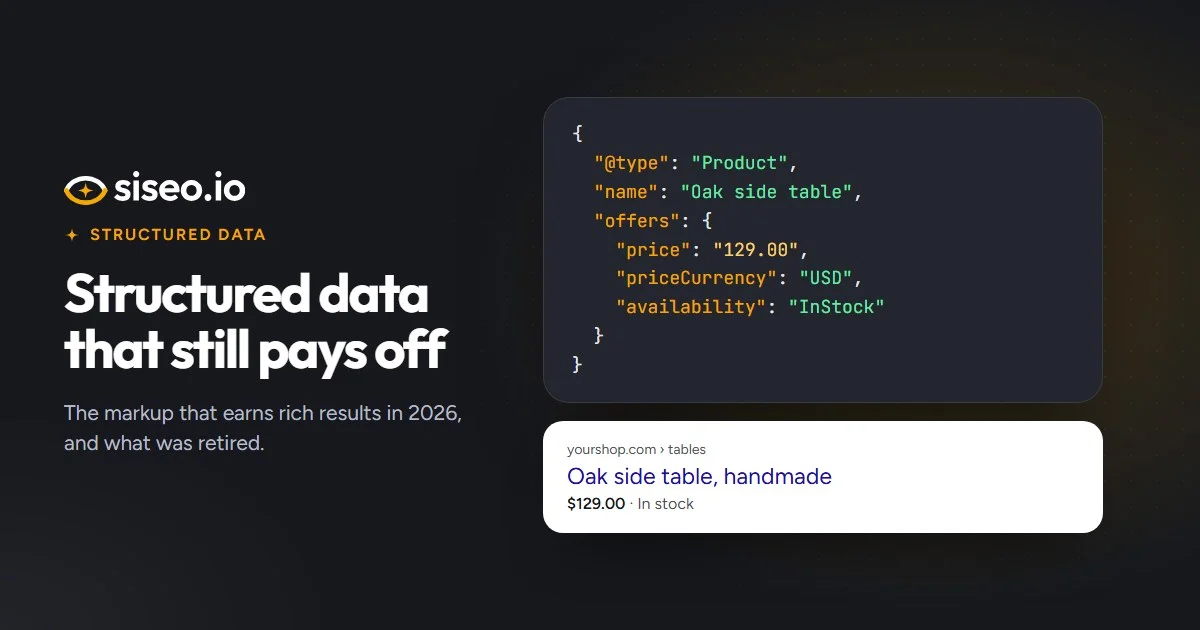
Product markup makes a product eligible for price, stock and star ratings under your listing, and for merchant listings, Google’s shopping-style results with price, delivery and returns details. Google’s requirements:
- Product rich results need a
nameplus at least one of an offer (the price), a review or an aggregate rating. - Merchant listings also need an
imageand an offer withpriceandpriceCurrency. - Write the price as a plain number,
1299.00rather than$1,299.00, and the currency as a three-letter code such as USD, EUR or GBP. - Availability, shipping and returns are recommended. Shipping and returns can be set once for the whole store, in Organization markup or in Google Merchant Center.
- An aggregate rating needs the score and the number of ratings or reviews; a review needs an author and a rating.
A minimal block that meets both sets of requirements:
<script type="application/ld+json">
{
  "@context": "https://schema.org",
  "@type": "Product",
  "name": "Oak dining table",
  "image": "https://www.example.com/images/oak-table.jpg",
  "offers": {
    "@type": "Offer",
    "price": "1250.00",
    "priceCurrency": "USD",
    "availability": "https://schema.org/InStock"
  }
}
</script>
On WordPress, WooCommerce adds Product markup like this to standard product pages by itself, and most current Shopify themes do the same; our WooCommerce SEO checklist covers what can break it. Events, recipes, videos, jobs and apps have requirements of their own, and siseo checks those too: an event, for example, needs a name, a start date and a location.
The rich results Google has retired
Google has stopped showing these rich results. The markup is still valid schema.org and does no harm, but it no longer earns anything extra in Google.
| Rich result | Markup behind it |
|---|---|
| FAQ | FAQPage |
| HowTo | HowTo |
| Sitelinks search box | SearchAction on WebSite |
| Fact check | ClaimReview |
| Estimated salary | EstimatedSalary, Occupation |
| Learning video | LearningResource |
| Special announcement | SpecialAnnouncement |
| Vehicle listing | VehicleListing |
| Practice problems | Quiz |
HowTo results went in 2023, the sitelinks search box in 2024, and FAQ results stopped showing for all sites in May 2026. Course info was retired as well, but the course list built from Course items in an ItemList still shows.
None of this is urgent. Keep retired markup if your SEO plugin adds it or another search engine, app or plugin uses it. Just don’t add new FAQ or HowTo markup in the hope of rich results; spend the time on types that still earn them, such as Product, BreadcrumbList, Review or Event. FAQ content still helps visitors as plain text on the page, and siseo reports retired markup as a note, not a problem.
Common mistakes that stop markup counting
- Broken JSON. One stray comma or quote mark makes a whole block unreadable, so search engines ignore everything in it. Look for a comma after the last item, an unescaped quote mark inside a value (such as
12" pizza), curly “smart” quotes pasted from a word processor, or a line break inside a value. Build the JSON in code, not by hand. - Missing labels. A block without
@context, or an item without@type, is skipped. - Products with no price. Without an offer, a review or a rating, product markup can’t earn product rich results, and Search Console reports it as invalid. It happens with “price on request” products, or when a template leaves the price out.
- Two tools, two copies. A theme, an SEO plugin and a reviews plugin can each print their own block, leaving a page with partial or conflicting copies. Let one tool handle structured data.
- Empty ratings. Rating markup with zero or empty values on products that have no reviews yet. Leave it out until real reviews exist.
- Markup added by JavaScript. Google reads it only after rendering the page (running its scripts), which can happen some time after it first fetches it, so price and stock changes may be picked up late, and tools that read only the HTML miss it. See JavaScript and AI crawlers.
How to check yours
Paste a page’s address into Google’s Rich Results Test or the Schema Markup Validator; both point to the line with any error. Fix the template, plugin or snippet that writes the markup, so every page is corrected at once, then watch the structured data reports in Search Console over the following weeks.
In short: structured data earns richer listings and helps Google understand your pages. It isn’t needed for AI answers, markup for retired results earns nothing new, and each page should carry one complete, accurate block for each thing it describes.