Black Friday: 50% off the full report and report packs until Tuesday 1 December.

Start a free scan

This is a sample report. Example Ceramics at example.com is a shop we made up, scanned with the same checks your site gets. Your report has these sections, filled with your own pages, problems and fixes.

Sample full report

Full SEO report for example.com

55
DNeeds work

38 issues: 2 high, 10 medium, 26 low

A well-made shop held back by fixable problems: AI search tools are shut out, a deleted plugin still loads on every page, and the homepage is slow on phones.

43 pages checked16 Nov 2026WordPress with WooCommerceScan took 1 min 52 s
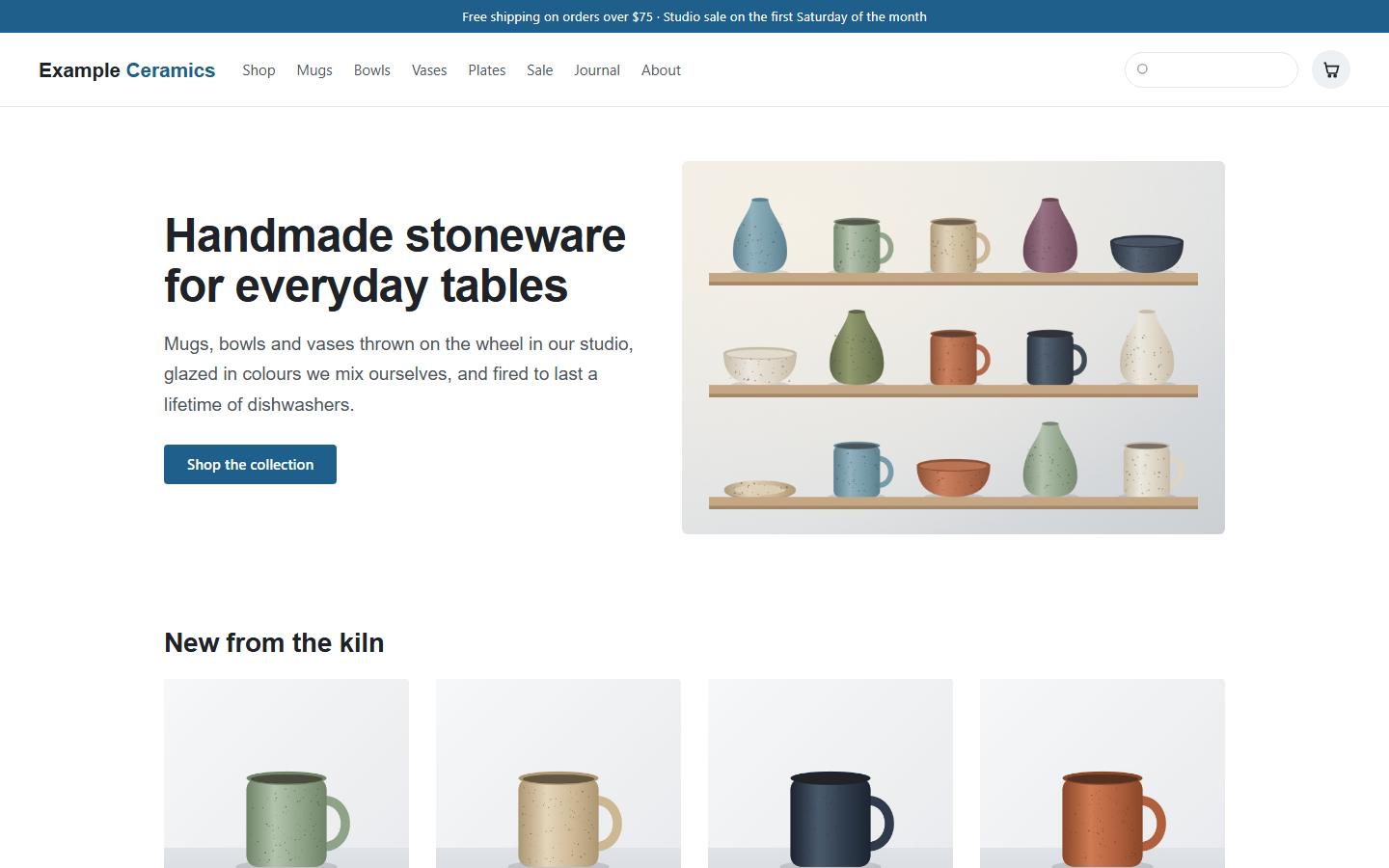
The homepage on a desktop screen
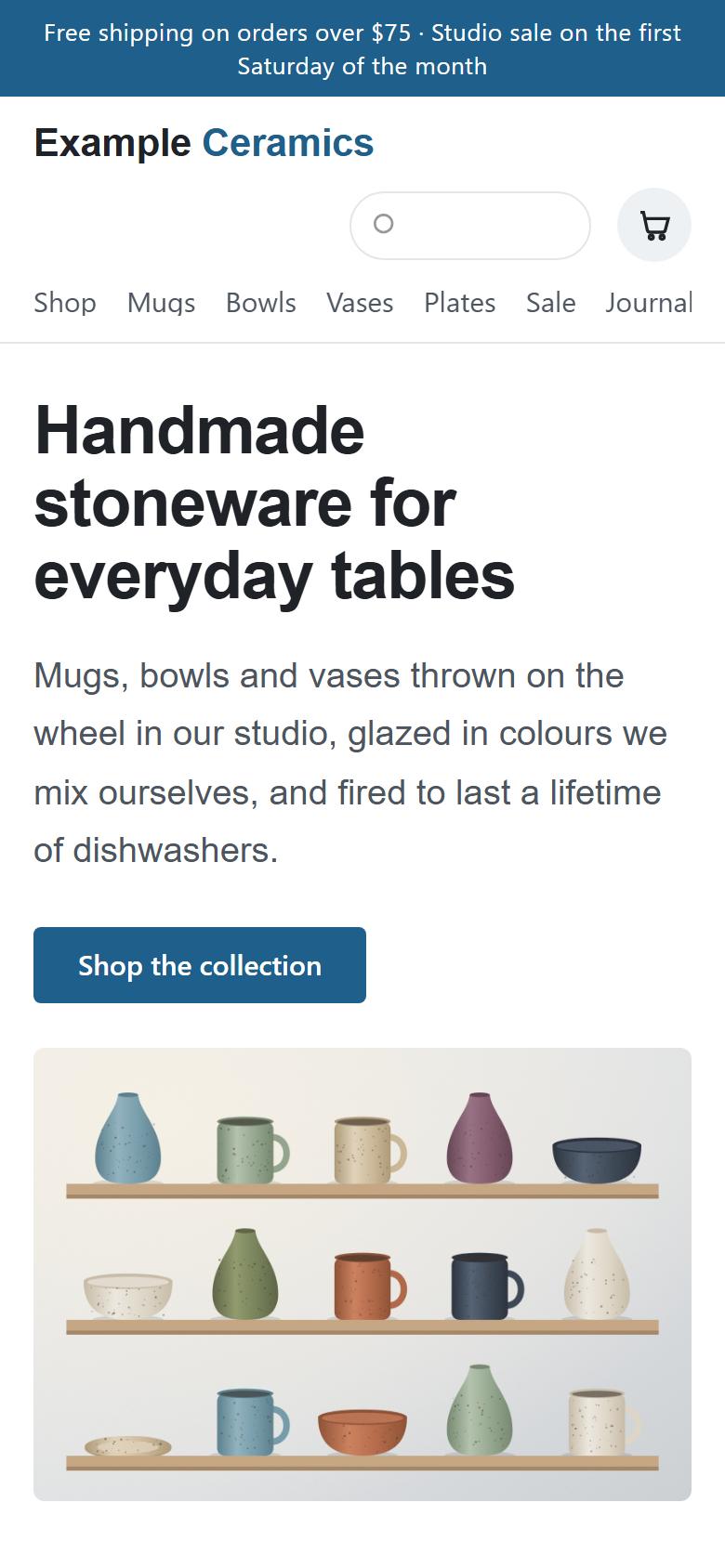
The homepage on a phone

Summary

What went into this report

  • 43pages read
  • 4,413words read
  • 62internal links checked
  • 244checks run
  • 8speed tests
  • 5pages run in a browser
  • 28AI crawlers tested
  • 6questions put to AI

Where the fixes take you

Fix the top 10 (about 1 working day of work) and your score goes from 55 to about 75.

  1. 55DToday38 issues to fix
  2. ~61DAfter the top 3 fixesabout 1 hour
  3. ~75CAfter the top 10 fixesabout 1 working day
  4. 100AAll 38 fixesabout 4 working days

Projected with siseo’s own score, by taking away what each issue costs today. Search engines don’t publish a score, and rankings depend on more than your own site.

The biggest problem

robots.txt blocks the crawlers behind ChatGPT search and Perplexity, so the shop can’t appear in their answers when someone asks where to buy handmade stoneware.

See the fix

Quick wins

  • Remove the OAI-SearchBot and PerplexityBot blocks from robots.txt; the GPTBot block for training can stay.
  • Delete the leftover Flex Slider Lite script tag from the theme: it fails on all 43 pages.
  • Replace the placeholder text on the Wholesale page with your real wholesale terms.
  • Point the “Sale” menu item straight at /shop/ instead of through the old redirect.

Does AI recommend you?

Written by AI (Google Gemini)

1of 6 AI answers named Example Ceramics

Named instead: Demo Stoneware (3 answers), Example Clay Co. (3 answers), Sample Kiln Studio (3 answers)

See the answers

Already working

  • Every page is served over HTTPS with a valid certificate, and the www and http addresses redirect to the same homepage.
  • Products have their own titles, descriptions and product markup, and the shop’s categories are one click from the homepage.
  • The server answers in a few hundred milliseconds, so the slowness on phones comes from images and scripts rather than hosting.

An optional extra: an llms.txt for AI assistants

example.com has no llms.txt: an optional file at /llms.txt that describes the site and its main pages for AI assistants that look for one. Google says Search doesn’t use it, and studies haven’t found that it changes AI answers, so treat it as a small extra rather than a fix. We wrote one from the pages we scanned: check the descriptions before you upload it.

The top ten fixes are about a day’s work, mostly in robots.txt, the theme and image settings, and clear most of what holds the score back.

Written by AI (Google Gemini)The verdict and this summary were written by AI from what the scan found. The scores, issues and fixes come from our checks.

How to read this report

The score

Out of 100: how well search engines and AI tools can find, read and trust the site. A is 90 and up, B 80, C 65, D 50, F below.

How serious an issue is

High can stop pages being found. Medium holds pages back. Low adds up across a site. Notes cost no points.

Points

Each issue shows what it takes off the score today. Fixing it gives the points back. All 38 together cost 45 points.

Who does the work

Site owner, content editor, developer or hosting provider, with about how long each fix takes.

Section 02

Scorecard

Six areas, each scored out of 100 from the checks in it. The overall score weights them by how much they matter for search.

Crawling and indexing
68C
6 issues, 55 checks passed
On-page and content
33F
13 issues, 36 checks passed
Speed and Core Web Vitals
49F
4 issues, 15 checks passed
Structured data
74C
5 issues, 20 checks passed
AI search readiness
60D
3 issues, 22 checks passed
Security and trust
47F
7 issues, 12 checks passed

Where the points went

Points each issue costs the overall score. What an issue costs today is what fixing it gives back.

  1. Main content appears a little slowly for real visitors on 1 page (3.3 s)−5.9
  2. Your robots.txt blocks OAI-SearchBot and PerplexityBot: did you mean to?−4.4
  3. 1 page links to 1 broken address on your site−3.2
  4. 1 script, stylesheet or font fails to load on 10 pages−2.9
  5. Content shifts a little for real visitors on 1 page (shift score 0.15)−2.9
  6. 1 page contains "lorem ipsum" placeholder text−1.8
  7. 5 form fields have no label on 5 pages−1.8
All 38 fixes, in the order to do them

Weights: Crawling and indexing 25%, On-page and content 20%, Speed and Core Web Vitals 20%, Structured data 10%, AI search readiness 15%, Security and trust 10%. The score is siseo’s own measure; search engines don’t publish scores.

Section 03

AI visibility

Whether AI assistants recommend you when your customers ask, whether AI can find, read and quote your site, and what to change so it can.

Can AI assistants reach and read your pages?

Measured

10 of 12 AI answer engines can reach your homepage

  • ChatGPT searchrobots.txt blocks OAI-SearchBot
  • Google AI Overviews and AI Mode
  • The Gemini app
  • Perplexityrobots.txt blocks PerplexityBot
  • Copilot and Bing
  • Claude
  • Siri, Spotlight and Safari
  • Meta AI
  • DuckDuckGo’s AI answers
  • You.com
  • Alexa
  • Mistral’s Le Chat

The pages we opened show their text without JavaScript, so crawlers that don’t run it read them in full.

What AI assistants said

Sampled
Written by AI (Google Gemini)

1 of 6 answers named Example Ceramics

  • Asked: Google Gemini, from memory, with web search off
  • Where: online
  • How: 6 questions your customers might ask, without your name in them

Named instead: Demo Stoneware (3 answers), Example Clay Co. (3 answers), Sample Kiln Studio (3 answers)

A sample, not a measurement: answers vary between assistants, wordings and days, and answers through an API aren’t always what the apps show. It doesn’t count toward your score.

Which of 28 search and AI crawlers can read your homepage

CrawlerUsed forPurposerobots.txtLive test
Googlebot Google
Google Search, including AI Overviews and AI Mode
AI search
AllowsBinding
Not imitated
Bingbot Microsoft
Bing, Copilot and AI answers grounded on Bing
AI search
AllowsBinding
Not imitated
OAI-SearchBot OpenAI
ChatGPT search results
AI search
Blocks. Did you mean to?Binding
Gets the page
Claude-SearchBot Anthropic
Claude search results
AI search
AllowsBinding
Gets the page
PerplexityBot Perplexity
Perplexity answers
AI search
Blocks. Did you mean to?Binding
Gets the page
Applebot Apple
Siri, Spotlight and Safari suggestions
AI search
AllowsBinding
Gets the page
ChatGPT-User OpenAI
Pages ChatGPT opens when a user asks
Assistant fetch
AllowsAdvisory
Gets the page
GPTBot OpenAI
OpenAI model training
Model training
Blocks, your choiceBinding
Gets the page
Show the other 20 crawlers
CrawlerUsed forPurposerobots.txtLive test
Google-Extended Google
Answers in Gemini’s apps and grounding in Vertex AI, and Gemini training (not Google Search or AI Overviews)
Gemini apps
AllowsBinding
Not testable
DuckAssistBot DuckDuckGo
DuckDuckGo AI answers
AI search
AllowsBinding
Gets the page
Meta-WebIndexer Meta
Meta AI search results and the links it cites
AI search
AllowsBinding
Gets the page
YouBot You.com
You.com search and AI answers
AI search
AllowsBinding
Gets the page
Amzn-SearchBot Amazon
Alexa and other Amazon search results
AI search
AllowsBinding
Gets the page
MistralAI-Index Mistral
Mistral AI search results
AI search
AllowsBinding
Gets the page
Claude-User Anthropic
Pages Claude opens when a user asks
Assistant fetch
AllowsBinding
Gets the page
Perplexity-User Perplexity
Pages Perplexity opens when a user asks
Assistant fetch
AllowsAdvisory
Gets the page
Meta-ExternalFetcher Meta
Links Meta AI opens when a user asks
Assistant fetch
AllowsAdvisory
Gets the page
Amzn-User Amazon
Pages Alexa opens to answer a user
Assistant fetch
AllowsAdvisory
Gets the page
MistralAI-User Mistral
Pages Mistral AI opens when a user asks
Assistant fetch
AllowsBinding
Gets the page
Google-Agent Google
Pages Google’s AI agents open to act for a user
Assistant fetch
No token
Gets the page
Google-GeminiNotebook Google
Pages people add to a Gemini notebook (formerly NotebookLM) as a source
Assistant fetch
AllowsAdvisory
Gets the page
ClaudeBot Anthropic
Anthropic model training
Model training
AllowsBinding
Gets the page
Applebot-Extended Apple
Apple model training
Model training
AllowsBinding
Not testable
CCBot Common Crawl
The Common Crawl dataset many models train on
Model training
AllowsBinding
Gets the page
Meta-ExternalAgent Meta
Meta AI model training
Model training
AllowsBinding
Gets the page
MistralAI-Training Mistral
Mistral AI model training
Model training
AllowsBinding
Gets the page
Bytespider ByteDance
ByteDance model training
Model training
AllowsAdvisory
Gets the page
Amazonbot Amazon
Amazon products and services, and Amazon model training
Model training
AllowsBinding
Gets the page

20 of them decide whether search engines and AI assistants can find, quote and link your pages (the free result counts these); the other 8 only collect AI training data, so blocking them is your choice and costs nothing here. robots.txt binds the crawlers marked “Binding”; for fetchers acting on a user’s request (“Advisory”) a rule states a wish, and only a firewall block stops them.

Live tests send each crawler’s published name from siseo’s servers, so they are indicative: firewalls that check crawlers’ network addresses may treat the real ones differently. Googlebot and Bingbot weren’t imitated on this site (we never do on WordPress, where security plugins may ban an address that imitates Google): they are read from robots.txt.

What crawlers that skip JavaScript see

Words in the HTML your server sends, against the page after JavaScript runs: ChatGPT’s, Claude’s, Perplexity’s and Meta’s crawlers read only the first
/
0% hidden
/product/speckled-mug-sage/
0% hidden
/shop/
0% hidden
/product-category/mugs/
0% hidden
/blog/
0% hidden

Switches no scan can see

Each can keep you out of AI answers while the site looks fine from outside; check them yourself
  • Google Search Console: “Search generative AI”. Under Settings. “Include” keeps your pages eligible for AI Overviews and AI Mode; “Exclude” removes them, with nothing to see from outside. Available worldwide since 31 August 2026.
  • Bing Webmaster Tools, with IndexNow. Verify your site and turn on IndexNow, which Bing names as its freshness lever for Copilot: changed pages reach its answers sooner.
  • Your CDN’s bot categories. If a CDN or firewall sits in front of the site, check its bot rules for AI crawlers: a rule for “AI bots” can catch search crawlers too.
  • Your host’s limits. Ask your host whether it rate-limits AI crawlers: managed WordPress hosts often answer busy crawlers with “too many requests”, which our test may not meet.

The answersWritten by AI (Google Gemini)

The exact questions, asked without your name, and the businesses each answer named
QuestionNamed youBusinesses named
Where can I buy handmade stoneware mugs online?
No
Example Clay Co., Sample Kiln Studio
Which small pottery studios sell dishwasher-safe dinnerware?
No
Sample Kiln Studio, Demo Stoneware
What is a good handmade ceramic gift under $60?
No
Example Clay Co.
Which independent potters make speckled glaze mugs?
Yes
Example Ceramics, Sample Kiln Studio
Where can I find a handmade moon vase?
No
Demo Stoneware
Who sells handmade ramen bowls online?
No
Example Clay Co., Demo Stoneware

What to do, and how sure we are

Every AI fix in this report, with how firm its evidence is and how to check it worked
What to doEvidenceWhoTimeHow to check it worked
Your robots.txt blocks OAI-SearchBot and PerplexityBot: did you mean to?
The engines document this
Site owner
about 15 min
Open yoursite.com/robots.txt: no group that names a search crawler, or "*", disallows the whole site any more.
Your site doesn’t state a postal address or the year you started
Some evidence
Site owner
about 30 min
Your About or Contact page states your name, address, contact details and founding year, and your Organization markup says the same.
No reviews on independent sites were found
Studies agree
Site owner
about 1 hour
Your homepage and product or service pages link to your reviews on an independent site.
Your site blocks OpenAI's GPTBot, an AI training crawler
Optional
Site owner
about 10 min
Open yoursite.com/robots.txt: the training groups name only the crawlers you chose.

“The engines document this”: the search engines and AI services say so themselves. “Studies agree”: independent measurements point the same way. “Some evidence”: likely to help, not proven. “Optional”: your choice, with no cost either way.

Could an AI agent buy from you, or send you an enquiry?

Agents in ChatGPT, Claude, Gemini and Copilot now browse for people and stop before payment. Checked on the pages we opened, without submitting anything

2 of 3 checks pass

Not part of your score
  • A real add-to-cart button with a name. “Add to basket” is a link an agent can find and press. /product/speckled-mug-sage/
  • The price is written as text. The product page shows its price as text an agent can read. /product/speckled-mug-sage/
  • Pages hold still while they load. Layout shift is 0.15 on the homepage (real visitors), over 0.1: buttons move as the page loads, so an agent can press the wrong one.

Lighthouse’s experimental Agentic Browsing audits on your homepage: 1 of 4 pass. Not passing: Buttons have an accessible name; Form elements have associated labels; Cumulative Layout Shift.

What your site offers agents

  • A UCP profile. None at /.well-known/ucp. The Universal Commerce Protocol tells shopping agents what a store can do; shop platforms are starting to publish it for their stores.
  • WebMCP. None found. Chrome’s trial lets a page declare its forms as tools an agent can call.
  • Markdown for agents. Not offered. Some CDNs, Cloudflare among them, can send agents a Markdown copy of each page.
  • llms.txt. Not present.

Information only: Google says its AI features need no special files or formats, and the evidence that any of these changes what agents do is still thin.

Buying inside AI assistants

Programmes that let shoppers check out without leaving the assistant. Not part of your score

Payment providers on your pages: none we could see (we don’t open checkout pages). We couldn’t tell where you sell, so the programmes are shown as they stand for US shops.

ProgrammeWhere it runsFor you
Copilot Checkout (Microsoft)
The US
Not through what we saw It works through Shopify, PayPal or Stripe, and we didn’t see any of them on your pages (checkout pages aren’t scanned).
Instant Buy (Perplexity)
The US
Not through what we saw It runs through PayPal, and we didn’t see PayPal on your pages (checkout pages aren’t scanned).
The Buy button in Google’s AI Mode (UCP)
The US, Canada, Australia
You could apply Google offers it to select merchants in the US, Canada and Australia through Merchant Center. It needs a UCP checkout integration, which some shop platforms provide.

ChatGPT isn’t listed: OpenAI moved its Instant Checkout into apps in March 2026. Shopping answers now come mostly from product feeds, which no scan can see; the structured data checks cover the fields those feeds are built from.

Check your own data

What only you can see: the engines’ own reports about your site
  • Google Search Console: the Generative AI report. Impressions in AI Overviews and AI Mode by page (no clicks or queries), live worldwide since 31 August 2026.
  • Bing Webmaster Tools: AI Performance. Copilot citations, sampled grounding queries and, since June 2026, citation share: real AI questions about your site.
  • Google Analytics 4: the AI Assistant channel. Visits referred by ChatGPT, Gemini and Copilot; clicks from AI Overviews stay under Organic Search.
  • Your server logs. Requests from the crawlers’ published network addresses are the only real confirmation of what our live test can only indicate.

llms.txt: not present. We wrote one for this site. It’s optional: Google doesn’t use it, and most AI crawlers don’t request it, so it isn’t scored.

How this area was measured, and its limits

  • Access is read from your robots.txt the way each crawler reads it, and tested live from siseo’s servers with each crawler’s published name. Firewalls that check network addresses may treat the real crawlers differently, so live results are indicative.
  • The answers are a sample: 6 answers from one AI model at one moment, asked without your name. Answers vary between assistants, wordings and days, and answers through an API aren’t always what the apps show, so they never count toward your score.
  • There is no single AI visibility number, rank or position here: the engines share too few sources for one number to mean anything, so access and answers are reported apart.
HighAI visibilityAffects the whole site+4.4 points if fixed

Your robots.txt blocks OAI-SearchBot and PerplexityBot: did you mean to?

Your robots.txt tells some AI search and assistant crawlers to stay away (listed below). Did you mean to? Most owners who block one didn’t: it comes from a rule meant for training bots or a blanket block on all bots. These crawlers decide whether your pages can be found, quoted and linked in Bing and Copilot, ChatGPT search, Claude, Perplexity, Siri and Spotlight, Meta AI, You.com, Alexa and DuckDuckGo’s AI answers. robots.txt binds the search crawlers, so the block has a real effect; for fetchers acting on a user’s request, such as ChatGPT-User, it is only advisory. Blocking training crawlers like GPTBot is a separate choice with no search cost.

On your siteWritten by AI (Google Gemini)

robots.txt has a block for OAI-SearchBot and one for PerplexityBot, pasted in with the GPTBot block above them. GPTBot only gathers training data and can stay blocked; the other two fetch pages for ChatGPT search and Perplexity’s answers, so remove those two blocks.

How to fix it

Remove the robots.txt rules that block AI search and assistant crawlers, and block only the training crawlers you choose to.

On WordPress Detected

  1. WordPress serves a virtual robots.txt; edit it in Yoast SEO (Yoast SEO → Tools → File editor) or Rank Math (Rank Math → General Settings → Edit robots.txt). A real robots.txt file in the site's root folder overrides both, so check for one in your host's file manager.
  2. Some security and "block AI" plugins write these rules; check their settings before editing by hand.
  1. Open yoursite.com/robots.txt and find the groups that name the crawlers listed below, or a "User-agent: *" group with "Disallow: /".
  2. Delete the Disallow rules for the search crawlers (Bingbot, OAI-SearchBot, Claude-SearchBot, PerplexityBot, Applebot, DuckAssistBot, Meta-WebIndexer, YouBot, Amzn-SearchBot, MistralAI-Index) and the assistant fetchers (ChatGPT-User, Claude-User, Perplexity-User, Meta-ExternalFetcher, Amzn-User, MistralAI-User).
  3. If you want to opt out of AI training, keep separate groups for training crawlers only: GPTBot, ClaudeBot, Applebot-Extended, CCBot, Meta-ExternalAgent, MistralAI-Training and Amazonbot. Add Google-Extended only if you also mean to leave Gemini’s app answers.
  4. A crawler named in its own group ignores the "User-agent: *" group, so repeat any private-path Disallow lines inside the new groups.
  5. Check that a security plugin, firewall or CDN isn't also blocking these crawlers (see the firewall check in this report).
  6. Allow a day or two for the crawlers to notice; OpenAI and Perplexity say about 24 hours, DuckDuckGo up to 72.
What we found
CrawlerOperatorUsed forFollows robots.txt
OAI-SearchBot
OpenAI
ChatGPT search results
Yes
PerplexityBot
Perplexity
Perplexity answers
Yes
Search and training, decided separately. A crawler with its own group ignores "User-agent: *", so repeat the private-path lines you still want (like /cart/ here)
# AI search crawlers and user-requested fetchers: let them read the site
User-agent: OAI-SearchBot
User-agent: ChatGPT-User
User-agent: PerplexityBot
User-agent: Perplexity-User
User-agent: Claude-SearchBot
User-agent: Claude-User
User-agent: Meta-WebIndexer
User-agent: DuckAssistBot
User-agent: YouBot
Allow: /
Disallow: /cart/

# Training only: a policy choice, with no AI-search penalty either way
User-agent: GPTBot
User-agent: ClaudeBot
User-agent: CCBot
User-agent: Applebot-Extended
Disallow: /

# Google-Extended also removes the site from Gemini app answers.
# Add it to the block above only if that is intended.

For your developer Each crawler obeys the most specific User-agent group that matches its token and ignores the * group when it has its own; a blanket Disallow: / under * blocks every crawler without a group of its own. robots.txt binds OAI-SearchBot, PerplexityBot, Claude-SearchBot, Claude-User, DuckAssistBot, Meta-WebIndexer, Applebot and YouBot (DuckAssistBot within 72 hours); for ChatGPT-User, Perplexity-User, Meta-ExternalFetcher, Google-Agent, Google-GeminiNotebook and Amzn-User it is advisory, so a firewall 403 to them is the real block. Applebot follows Googlebot's rules when robots.txt doesn't name it, and Claude's search draws on Brave, which won't crawl what Googlebot can't. A Googlebot block is reported once, under Crawling and indexing.

LowAI visibilityAffects the whole site+1.2 points if fixed

Your site doesn’t state a postal address or the year you started

AI assistants describe and recommend businesses they can identify with confidence: one name, a place, a way to get in touch, how long they’ve traded. When the name differs between your structured data, your sharing name and your titles, or the basic facts aren’t stated anywhere, assistants are less sure who you are and more likely to name someone else.

How to fix it

Use one business name everywhere, and state your address, contact details and founding year on your About or Contact page and in your Organization structured data.

On WordPress Detected

  1. Yoast SEO (Settings → Site representation) and Rank Math (Titles & Meta → Local SEO) write the Organization structured data from the details you enter there.
  1. Pick the name you trade under and use it in your structured data, your sharing name (og:site_name) and your page titles; the names found are shown below.
  2. State your postal address (or the area you serve), a phone number or email, and the year you started on your About or Contact page.
  3. Add the same facts to your Organization or LocalBusiness structured data: name, address, telephone, email and foundingDate.
  4. Keep your Google Business Profile and directory listings matching these details.
What we found
Missing: a postal address, the year you started

For your developer Organization or LocalBusiness names in JSON-LD and og:site_name that differ once case, punctuation and legal suffixes are removed; or two or more of: no address (schema address, or a street address on the About, Contact or home page), no telephone, email or contactPoint (or tel: or mailto: link), no foundingDate (or text such as “since 2009”).

LowAI visibilityAffects the whole site+0.4 points if fixed

No reviews on independent sites were found

When AI assistants decide which businesses to recommend, they lean on what others say about them, and reviews on sites the business doesn’t control (Trustpilot, Google, Feefo, G2 and the like) count for more than reviews on its own pages. We found no link to reviews like that on your site.

How to fix it

Collect reviews on an independent site that suits your business, and link to them from your site.

  1. Choose one review site your customers already use: Google for local businesses; Trustpilot, Feefo or Reviews.io for shops; G2 or Capterra for software.
  2. Ask every customer the same way after a purchase or a job, with nothing offered in return, so the reviews stay credible and within consumer-protection rules.
  3. Link to your review page, or add the review site’s widget, on your homepage and your product or service pages.

For your developer No link or script on the crawled pages points at an independent review platform (Trustpilot, Reviews.io, Feefo, Trusted Shops, Google Maps reviews, Yelp, Tripadvisor, G2, Capterra, TrustRadius, Checkatrade, BBB and similar). Product reviews on the site itself don’t count: the business controls them.

about 1 hourSite owner Source: Google: AI features and your website
1 note worth knowing (no points lost)
NoteAI visibility

Your site blocks OpenAI's GPTBot, an AI training crawler

Your site blocks some crawlers that collect content to train AI models (listed below), in robots.txt or at your firewall. That is a legitimate business choice: it doesn't affect Google Search or AI Overviews, and ChatGPT search, Claude and Perplexity use separate search crawlers. A few crawlers serve more than one purpose, such as Amazonbot, which also feeds Alexa answers. And if the block is Cloudflare's own training setting, Cloudflare says it now also stops crawlers that do both search and training, including Googlebot, so check how the block is set up.

How to fix it

Keep the block if it is your choice; otherwise remove the robots.txt or firewall rules for the crawlers you want to allow.

  1. Review the crawlers listed below and what each one feeds.
  2. Decide as a business whether you want your content used to train AI models; for pure training crawlers there is no search cost either way.
  3. If you want to allow them, remove their Disallow rules from robots.txt and any firewall or CDN blocks.
  4. If you keep blocking them, make sure the same rules don't also catch search crawlers (OAI-SearchBot, Claude-SearchBot, PerplexityBot, Applebot) or, on Cloudflare, Googlebot and Bingbot.
What we found
CrawlerOperatorUsed for
GPTBot
OpenAI
OpenAI model training

For your developer Training opt-out tokens include GPTBot (OpenAI), ClaudeBot (Anthropic), Applebot-Extended (Apple model training; a robots.txt token only, not a separate crawler), CCBot (Common Crawl), Meta-ExternalAgent, Bytespider and Amazonbot. Google-Extended isn't on this list: since October 2026 it also decides whether Gemini's apps may use the site in their answers, so it has a finding of its own. A robots.txt group for these doesn't affect Googlebot, OAI-SearchBot, Claude-SearchBot or PerplexityBot. Cloudflare, however, says any configuration that blocks AI training also blocks mixed-purpose crawlers, and it names Googlebot, Applebot and Bingbot among them.

18 checks passed in this areaShow them
  • Gemini’s apps may use your pages (Google-Extended is allowed)
  • AI search crawlers can reach your homepage
  • No section-level blocks for AI search crawlers
  • AI crawlers get the same homepage as browsers
  • No AI crawler was rate-limited
  • No crawler is asked to pay
  • Page text is in the HTML, not added by JavaScript
  • Every page title is in the HTML
  • Titles are in the head of the HTML
  • Main headings are in the HTML
  • The footer is in the HTML
  • Structured data is in the HTML
  • Internal links are in the HTML
  • Robots rules are the same with and without JavaScript
  • Canonical URLs are the same with and without JavaScript
  • No page blocks snippets
  • No page limits snippets to a few words
  • No page limits Copilot with nocache
Section 04

Speed

How fast your pages load and respond for real visitors, what slows each type of page down, and what to fix first.

Core Web Vitals on mobile

Google’s page experience measures, from Chrome users over the last 28 days
LCP Main content appears3.3 sNeeds improvement
Good ≤ 2.5 sPoor > 4.0 s

Real visitors, this page

INP Responds to taps and clicks190 msGood
Good ≤ 200 msPoor > 500 ms

Real visitors, this page

CLS Layout stays still0.15Needs improvement
Good ≤ 0.10Poor > 0.25

Real visitors, this page

Lab tests by type of page

Lighthouse 13 through PageSpeed Insights, one representative page each
PageMobile scoreDesktop scoreLCP (mobile)TBT (mobile)CLS (mobile)
Homepage
/
51
86
4.3 s
420 ms
0.16
Product page
/product/speckled-mug-sage/
58
88
3.7 s
360 ms
0.08
Category or listing page
/product-category/mugs/
56
87
3.9 s
390 ms
0.09
Article or blog post
/blog/how-to-care-for-stoneware/
69
93
2.9 s
240 ms
0.02

Lighthouse’s experimental Agentic Browsing audits: 1 of 4 pass on the homepage, a measure of how easily an AI agent could use the page. They don’t count towards your score; the AI area has the details.

MediumSpeedReal visitors on your homepage, from Google’s Chrome UX Report+2.9 points if fixed

Content shifts a little for real visitors on 1 page (shift score 0.15)

Something on this page moves after it appears: an image without reserved space, a banner sliding in, or text reflowing when the font loads. On at least one visit in four the shifts add up to more than 0.1, so Google rates layout stability as "needs improvement" (poor starts at 0.25). Even small jumps cause mis-taps and make a site feel unfinished. Google says Core Web Vitals are used by its ranking systems, but relevance comes first.

How to fix it

Find the element that moves and reserve its space, or show it as an overlay.

On WordPress Detected

  1. WordPress adds width and height to images inserted in the editor, but sliders, page builders and custom HTML often lack them; turn on "Add missing image dimensions" in WP Rocket or "Add Missing Sizes" in LiteSpeed Cache.
  2. Set cookie-consent and pop-up plugins to appear as overlays, not as bars that push the page down.
  1. Check the "Layout shift culprits" insight in PageSpeed Insights for a listed page.
  2. Give images and videos width and height attributes so the browser reserves their space.
  3. Give banners, embeds and widgets a fixed minimum height, or show them as overlays.
  4. Load web fonts with font-display: optional or a size-matched fallback.
  5. Watch the real-user figure in Search Console's Core Web Vitals report over the next 28 days.
What causes it

Fixing these is how this gets better, so they count as one item on the list, worth all their points together. Each has its own fix below.

What we found
Metric: CLS, how much the layout jumps
PageDevice75th percentileData
Homepage
mobile
0.15
this page
Homepage
mobile
0.14
whole site

For your developer At this level one recurring culprit is typical: an unsized hero or logo, a consent bar inserted at the top, or a font swap. Use the Layout Shift Regions overlay in DevTools (Rendering tab) or the web-vitals attribution build to log the largest shift source in production, then fix with intrinsic size attributes, min-height placeholders, or font metric overrides on the fallback.

One cause of Content shifts a little for real visitors on 1 page (shift score 0.15)

LowSpeedLab test, 1 of 4 sample pages+1.4 points if fixed

Page elements jump while loading on 1 page

In Lighthouse's test, parts of this page moved after they had appeared, and it identified the likely culprits: images without set dimensions, ads or embeds injected after load, web fonts swapping in, or animations that move the layout. Moving content makes people lose their place or tap the wrong button, and if real visitors see the same shifts it counts against Google's layout-stability Core Web Vital (CLS).

How to fix it

Reserve space for images, embeds and banners, and stop late content from pushing the page around.

On WordPress Detected

  1. WordPress adds width and height to images inserted in the editor, but sliders, page builders and custom HTML often lack them; turn on "Add missing image dimensions" in WP Rocket or "Add Missing Sizes" in LiteSpeed Cache.
  2. Set cookie-consent and pop-up plugins to appear as overlays, not as bars that push the page down.
  1. In PageSpeed Insights, expand "Layout shift culprits" to see which elements moved and why.
  2. Add width and height (or a CSS aspect ratio) to every image and video.
  3. Give ads, embeds, cookie banners and widgets a fixed-size slot, or show them as overlays.
  4. Load web fonts with font-display: optional, or match the fallback font's size so text doesn't reflow.
  5. Animate with transform and opacity instead of changing size or position.
What we found
Lighthouse audit: Layout shift culprits
PageBiggest offendersPossible saving
Homepage
div.bar: inserted after the page started to load
Web font loaded
CLS 0 ms

For your developer The insight attributes shifts in the lab trace to unsized images, injected iframes, web fonts and non-composited animations, and offers a best guess that you should confirm in the Performance panel's layout shift track. Fix with intrinsic size attributes or aspect-ratio, min-height placeholders for injected content, font metric overrides (size-adjust, ascent-override) on fallbacks, and transform-based animations.

about 1.5 hoursDeveloper Sources: Chrome: Layout shift culprits, web.dev: Optimize CLS
MediumSpeedReal visitors on your homepage, from Google’s Chrome UX Report+5.9 points if fixed

Main content appears a little slowly for real visitors on 1 page (3.3 s)

On at least one visit in four, this page takes more than 2.5 seconds to show its main content, so Google rates it "needs improvement" rather than good (poor starts at 4 seconds). The data comes from real Chrome users over the last 28 days. Visitors notice the wait, especially on phones, and a faster first view keeps more of them on the page. Google says Core Web Vitals are used by its ranking systems, but relevance always comes first, so treat this mainly as a question of visitors and sales, with a modest search effect.

On your siteWritten by AI (Google Gemini)

Real visitors on phones wait 3.3 s for the homepage’s main content, which is the studio photo. Making that image smaller (see “Improve image delivery”) is the biggest single step towards Google’s 2.5 s.

How to fix it

Shave the delay off the main content: a faster server response, an optimized main image fetched early, and fewer files blocking the first view.

On WordPress Detected

  1. Turn on page caching with your host's cache or a plugin such as WP Rocket or LiteSpeed Cache (LiteSpeed Cache needs a LiteSpeed server).
  2. Use an image optimizer such as ShortPixel, Imagify or EWWW Image Optimizer to compress images and serve WebP or AVIF.
  3. Make sure the main image isn't lazy-loaded: WordPress skips lazy loading for the first large image, but sliders, page builders and the lazy-load settings in optimization plugins can override that.
  4. Replace a slider at the top of the page with a single image.
  1. Open a listed page in PageSpeed Insights and read the "LCP breakdown" insight to see which phase takes longest.
  2. If time to first byte is the biggest part, check that full-page caching is working and consider a CDN.
  3. If the main element is an image, compress it, serve WebP or AVIF at its displayed size, and give it fetchpriority="high" instead of lazy loading.
  4. Defer scripts and stylesheets that block the first view.
  5. Track progress in Search Console's Core Web Vitals report over the next 28 days.
What causes it

Fixing these is how this gets better, so they count as one item on the list, worth all their points together. Each has its own fix below.

What we found
Metric: LCP, how fast the main content appears
PageDevice75th percentileData
Homepage
mobile
3.3 s
this page
Homepage
mobile
3.1 s
whole site

For your developer Use the LCP breakdown (TTFB, resource load delay, load duration, render delay) to target the largest subpart; at this level a single fix such as removing lazy loading from the LCP image, preloading a late-discovered hero or caching HTML at the edge is often enough. Values are CrUX 75th percentiles over 28 days, so verify with the web-vitals library or RUM before the field data moves.

One cause of Main content appears a little slowly for real visitors on 1 page (3.3 s)

LowSpeedLab test, 4 sample pages+2.2 points if fixed

Images are heavier than needed on 4 pages (lab test: could save up to 1.3 s)

Lighthouse found images on these pages that are bigger files than they need to be: saved at a higher quality than anyone can see, in older formats like JPEG or PNG instead of WebP or AVIF, or far larger than the space they fill on screen. Every extra kilobyte is time a phone spends downloading before the page looks finished, and images are usually the heaviest part of a page. It is one of the easiest speed wins, because it doesn't change how the page looks.

On your siteWritten by AI (Google Gemini)

The homepage photo of the studio shelves is a 1600×1100 JPEG of 812 KiB, shown at about 900 px wide on phones. Saved as WebP at that size it comes in under 150 KiB, which is most of the 1.25 s Google estimates you could save.

How to fix it

Compress images, serve them as WebP or AVIF, and size them to the space they fill on screen.

On WordPress Detected

  1. Install an image optimizer such as ShortPixel, Imagify or EWWW Image Optimizer to compress existing images and serve modern formats.
  2. WordPress creates resized copies and srcset for images added through the editor; images set as page-builder backgrounds or in custom HTML often miss out.
  1. Open the page in PageSpeed Insights and expand "Improve image delivery" to see each image and its possible saving.
  2. Resize originals before uploading; about twice the largest size an image is shown at is plenty for sharp screens.
  3. Convert photos to WebP or AVIF at a sensible quality, or let an image plugin or image CDN do it automatically.
  4. Use responsive images (srcset and sizes) so phones get smaller files than desktops.
  5. Replace large animated GIFs with short MP4 or WebM videos.
Modern formats at the right size (drop loading="lazy" for the main image)
<picture>
  <source type="image/avif" srcset="/img/sofa-800.avif 800w, /img/sofa-1600.avif 1600w" sizes="(max-width: 800px) 100vw, 800px">
  <source type="image/webp" srcset="/img/sofa-800.webp 800w, /img/sofa-1600.webp 1600w" sizes="(max-width: 800px) 100vw, 800px">
  <img src="/img/sofa-800.jpg" width="800" height="600" alt="Gray three-seat sofa" loading="lazy">
</picture>

For your developer The insight compares each image's bytes with an efficient bytes-per-pixel target for its format and displayed size, and ignores images with less than 4 KiB of possible savings. Serve AVIF or WebP via <picture> or Accept-header negotiation (with Vary: Accept), generate srcset widths with accurate sizes, consider an image CDN to automate it, and replace animated GIFs with <video autoplay muted loop playsinline>.

One cause of Main content appears a little slowly for real visitors on 1 page (3.3 s)

LowSpeedLab test, 4 sample pages+2.2 points if fixed

CSS and scripts delay the first view on 4 pages (lab test: could save up to 610 ms)

Before showing anything, the browser has to download and process certain CSS and JavaScript files linked at the top of these pages. Until they arrive the visitor sees a blank screen, and on a phone over a mobile connection each one adds noticeable delay. Lighthouse estimates the page could appear sooner if these files were deferred, trimmed or partly inlined.

On your siteWritten by AI (Google Gemini)

Three files hold up the first paint on phones: WordPress’s block styles, WooCommerce’s stylesheet and jQuery. A caching plugin with “defer JavaScript” and “critical CSS” options handles all three without touching the theme.

How to fix it

Load only the CSS needed for the first screen up front, and defer everything else.

On WordPress Detected

  1. WP Rocket ("Remove unused CSS" and "Load JavaScript deferred") or LiteSpeed Cache's CSS and JavaScript settings can handle most of this; switch options on one at a time and test.
  2. Unload plugin files on pages that don't use them with a tool such as Perfmatters or Asset CleanUp.
  1. In PageSpeed Insights, expand "Render-blocking requests" to see which files block and how long each takes.
  2. Add defer to scripts in the head that don't need to run before the page is visible.
  3. Remove stylesheets the page doesn't use, often from plugins, apps or unused fonts.
  4. Have your developer inline the small amount of CSS needed for the top of the page and load the rest without blocking.
  5. Re-test and confirm menus, sliders and forms still work.
Critical CSS inline, the rest loaded without blocking
<style>/* only the styles for the header and first screen */</style>
<link rel="stylesheet" href="/css/site.css" media="print" onload="this.media='all'">
<noscript><link rel="stylesheet" href="/css/site.css"></noscript>
<script src="/js/site.js" defer></script>

For your developer Render-blocking requests are stylesheets (without a non-matching media attribute) and synchronous scripts in the head that must load before first paint. Defer non-critical JS, inline critical above-the-fold CSS and load the rest with a media swap or preload, remove @import chains, and preconnect to required third-party origins; keep inlined CSS small, since it is resent with every HTML response.

LowSpeedLab test, 4 sample pages+0.7 points if fixed

4 pages ship extra code for old browsers

Some JavaScript on these pages includes add-ons and rewrites (polyfills) that let it run in old browsers, even though today's browsers don't need them. Every visitor downloads and runs that extra code, which slows loading a little, especially on phones. It is usually a build setting, or an old version of a library, plugin or app.

How to fix it

Build JavaScript for current browsers, and update libraries that bundle old polyfills.

  1. In PageSpeed Insights, expand "Legacy JavaScript" to see which files contain the extra code.
  2. If a file belongs to a plugin, app or third-party service, update it or ask the vendor for a modern build.
  3. For your own code, ask your developer to target current browsers in the build settings (Browserslist "baseline widely available").
  4. Remove polyfill services and libraries that were added years ago for old browsers.
In package.json
{
  "browserslist": ["baseline widely available"]
}

For your developer The insight detects polyfills and transpilation for features that are Baseline widely available, such as classes, async/await, spread and Array.prototype.includes. Set Browserslist to "baseline widely available", configure @babel/preset-env with that target and useBuiltIns: "usage" rather than importing core-js wholesale, and check that dependencies don't ship ES5 builds with their own polyfills.

LowSpeedLab test, 4 sample pages+0.7 points if fixed

Third-party code weighs down 4 pages

Code from other companies, such as analytics, ad networks, chat widgets, review apps, social embeds and video players, takes a large share of the downloading and processing on these pages. You don't control how fast those services are, and each one competes with your own content for the visitor's connection and phone. Each tool should earn its place.

How to fix it

Remove third-party tools you don't use, and load the rest later or only on the pages that need them.

On WordPress Detected

  1. Many third-party scripts arrive through plugins (chat, reviews, social feeds, pop-ups); remove those you don't need and use the delay-JavaScript option in WP Rocket or LiteSpeed Cache for the rest.
  1. In PageSpeed Insights, open "Third parties" to see each provider's download size and processing time.
  2. List the tools and ask of each one: do we still use it, and on which pages?
  3. Remove the ones you don't need, including old tags in your tag manager.
  4. Load chat widgets, video embeds and social feeds only when the visitor interacts, using a click-to-load placeholder.
  5. Load what remains with async or defer, or after the page has finished loading.
What we found
PageBiggest offendersMain-thread timeSize
Homepage
Google Tag Manager 312 ms
Facebook 188 ms
Hotjar 140 ms
640 ms
209 KB
/product/speckled-mug-sage/
Google Tag Manager 312 ms
Facebook 188 ms
Hotjar 140 ms
640 ms
209 KB
/product-category/mugs/
Google Tag Manager 312 ms
Facebook 188 ms
Hotjar 140 ms
640 ms
209 KB
/blog/how-to-care-for-stoneware/
Google Tag Manager 312 ms
Facebook 188 ms
Hotjar 140 ms
640 ms
209 KB
All 4 affected pages

For your developer The insight groups requests by provider using the Third Party Web dataset and shows transfer size and main-thread time for each. Use facades for heavy embeds (video players, chat loaded on interaction), fire tag-manager tags after load and only where consent allows, self-host small critical assets where the license permits, and preconnect only to origins needed early.

15 checks passed in this areaShow them
  • No page has a poor LCP (over 4 s) for real visitors
  • No page has a poor INP (over 500 ms) for real visitors
  • No page in INP's "needs improvement" range (200–500 ms)
  • No page has a poor CLS (over 0.25) for real visitors
  • The server responds in under 1.8 s for real visitors
  • Every page started responding within 1.5 s
  • Pages are sent compressed
  • Page HTML stays under 500 KB
  • The server supports HTTP/2
  • The main image is requested early
  • The server answers quickly, without redirects
  • Static files have long cache lifetimes
  • Text shows while web fonts load
  • No duplicated JavaScript
  • Page structure is a manageable size
Section 05

Recommended fixes

Every fix we recommend for example.com, the ones that lift your score most first. Each links to its evidence and step-by-step instructions in this report; tick it off when it’s done.

  1. 1Your robots.txt blocks OAI-SearchBot and PerplexityBot: did you mean to?AI visibility, site owner, about 15 minHigh+4.4 pts
  2. 21 script, stylesheet or font fails to load on 10 pagesOn-page and content, developer, about 30 minHigh+2.9 pts
  3. 318 product pages have offers without a price or currencyStructured data, developer, about 30 minMedium+1.1 pts
  4. 41 page contains "lorem ipsum" placeholder textOn-page and content, content editor, about 15 minMedium+1.8 pts
  5. 5Content shifts a little for real visitors on 1 page (shift score 0.15)Speed, developer, about 1.5 hoursMedium+2.9 pts
  6. 6Main content appears a little slowly for real visitors on 1 page (3.3 s)Speed, developer, about 3 hoursMedium+5.9 pts
  7. 72 WordPress plugins are out of dateSecurity and trust, site owner, about 20 minMedium+1.1 pts
  8. 8example.com has no DMARC record against email spoofingSecurity and trust, site owner, about 30 minMedium+1.1 pts
  9. 9Your site runs WordPress 7.0.8; the latest is 7.1.4Security and trust, developer, about 45 minMedium+1.1 pts
  10. 10Your site lists its WordPress user names to anyone who asksSecurity and trust, developer, about 30 minMedium+1.1 pts

Everything else, by when to do it

Later 26

1 page links to 1 broken address on your siteInternal links, about 5 minYour Google snippet promises “Free shipping”, but no other page says soOn-page and content, about 20 minYour site doesn’t state a postal address or the year you startedAI visibility, about 30 min1 page throws JavaScript errors while loadingOn-page and content, about 45 min5 form fields have no label on 5 pagesMobile and accessibility, about 1.5 hours1 page is in your sitemap but not linked from your siteInternal links, about 5 min
20 more
Your sitemap lists 1 address that redirects elsewhereCrawling and indexing, about 30 min43 pages link to addresses that redirectInternal links, about 45 minYour footer still says © 2023On-page and content, about 10 minYour site doesn't tell browsers to always use HTTPS (no HSTS)Security and trust, about 15 minYour homepage has no Organization markupStructured data, about 30 minYour site reveals the software it runs: WordPress 7.0.8Security and trust, about 20 minYour homepage has no WebSite markup with your site nameStructured data, about 15 minWordPress XML-RPC is open at /xmlrpc.phpSecurity and trust, about 15 min95 pieces of text are too faint to read easily on 5 pagesMobile and accessibility, about 1 hour18 product pages are missing stock, image, brand, shipping or returns detailsStructured data, about 1 hour4 pages ship extra code for old browsersSpeed, about 1 hourThird-party code weighs down 4 pagesSpeed, about 1.5 hours1 sitemap file gives every page the same last-modified dateCrawling and indexing, about 30 min12 pages have very little main contentOn-page and content, about 2 working daysNo reviews on independent sites were foundAI visibility, about 1 hour4 pages have no meta descriptionOn-page and content, about 20 min4 pages are missing Open Graph tags for link previewsOn-page and content, about 20 min3 category pages have a one-word titleOn-page and content, about 15 min8 pages have article markup missing recommended detailsStructured data, about 30 min1 page links to pages on other websites that no longer existInternal links, about 5 min
Section 06

Ready-made fixes

The text and code these fixes need, already written for example.com from what the scan found. Check each one, then copy it into your site, or send this section to whoever looks after it.

Your llms.txt

Your site has no llms.txt: a short Markdown file that tells AI assistants what the site is and which pages matter. It’s a proposed standard that some AI tools read; Google Search doesn’t use it, so it’s a quick first step rather than a ranking fix. We wrote this one from the pages we scanned, with their own titles and descriptions. Check the descriptions, add anything a customer should know, then upload it.

Save as llms.txt, so it opens at https://example.com/llms.txt
# Example Ceramics

> Handmade stoneware from a two-person pottery studio: mugs, bowls, vases and plates, thrown and glazed by hand. Free shipping over $75.

## Pages

- [About the studio](https://example.com/about/): Example Ceramics is a two-person pottery studio making handmade stoneware since 2016.
- [Contact us](https://example.com/contact/): Questions about an order, wholesale or a custom piece? Write to the studio and we’ll reply within two working days.
- [Wholesale](https://example.com/wholesale/): Stock Example Ceramics in your shop or café: wholesale prices and minimum orders.
- [Shipping](https://example.com/shipping/): We ship within three working days, free on orders over $75, in recycled packaging.
- [Questions](https://example.com/faq/): Answers about dishwashers, glazes, shipping, returns and custom orders.
- [Care guide](https://example.com/care-guide/): How to wash, store and look after handmade stoneware.

## Categories

- [Shop all handmade ceramics](https://example.com/shop/): Every mug, bowl, vase and plate in the shop, made by hand in our studio.
- [Mugs and cups](https://example.com/product-category/mugs/): Wheel-thrown mugs with thick walls that keep coffee hot, and handles sized for a whole hand rather than two fingers. Handmade in our studio.
- [Bowls](https://example.com/product-category/bowls/): Bowls for ramen, cereal, salads and sharing, glazed inside and out and safe in the dishwasher and microwave. Handmade in our studio.
- [Vases](https://example.com/product-category/vases/): Vases from a single stem to an armful of branches, glazed inside so they hold water without a liner. Handmade in our studio.
- [Plates and platters](https://example.com/product-category/plates/): Everyday plates with a raised rim that keeps sauces in, and platters big enough for a whole roast. Handmade in our studio.
- [Journal](https://example.com/blog/): Notes from the studio: caring for stoneware, glazes, setting a table and the occasional sale.

## Products

- [Speckled mug, sage](https://example.com/product/speckled-mug-sage/): Speckled mug, sage, handmade stoneware in our sage glaze. Dishwasher and microwave safe. $28.00, free shipping over $75.
- [Speckled mug, sand](https://example.com/product/speckled-mug-sand/): Speckled mug, sand, handmade stoneware in our sand glaze. Dishwasher and microwave safe. $28.00, free shipping over $75.
- [Tall latte mug](https://example.com/product/tall-latte-mug/): Tall latte mug, handmade stoneware in our ink glaze. Dishwasher and microwave safe. $32.00, free shipping over $75.
- [Espresso cups, set of four](https://example.com/product/espresso-cup-set/): Espresso cups, set of four, handmade stoneware in our rust glaze. Dishwasher and microwave safe. $54.00, free shipping over $75.
- [Camp mug](https://example.com/product/camp-mug/): Camp mug, handmade stoneware in our moss glaze. Dishwasher and microwave safe. $26.00, free shipping over $75.
- [Ramen bowl](https://example.com/product/ramen-bowl/): Ramen bowl, handmade stoneware in our ink glaze. Dishwasher and microwave safe. $42.00, free shipping over $75.
- [Breakfast bowl](https://example.com/product/breakfast-bowl/): Breakfast bowl, handmade stoneware in our bone glaze. Dishwasher and microwave safe. $30.00, free shipping over $75.
- [Large serving bowl](https://example.com/product/serving-bowl-large/): Large serving bowl, handmade stoneware in our sea glaze. Dishwasher and microwave safe. $88.00, free shipping over $75.
- [Nesting bowls, set of three](https://example.com/product/nesting-bowls/): Nesting bowls, set of three, handmade stoneware in our sand glaze. Dishwasher and microwave safe. $96.00, free shipping over $75.
- [Dip bowls, set of four](https://example.com/product/dip-bowls/): Dip bowls, set of four, handmade stoneware in our rust glaze. Dishwasher and microwave safe. $38.00, free shipping over $75.

## Articles

- [Studio sale: seconds and samples, first Saturday of the month](https://example.com/blog/studio-sale/)
- [How to care for stoneware so it lasts for decades](https://example.com/blog/how-to-care-for-stoneware/): Dishwashers, ovens, freezers and chips: what handmade stoneware can take, and the few things that crack it.
- [Sage, sand or ink: how our glazes get their colour](https://example.com/blog/what-glaze-colours-mean/)
- [Setting a table with handmade plates: mixing colours, sizes and a few rules we break](https://example.com/blog/setting-a-table-with-handmade-plates/)
- [Inside the studio: a week of making, from clay to kiln](https://example.com/blog/inside-the-studio/): Monday to Friday in a small pottery: wedging, throwing, trimming, two firings and the pieces that don’t make it.
- [Choosing a vase for the flowers you actually buy](https://example.com/blog/choosing-a-vase/): A short guide to matching vase shapes to supermarket bunches, garden cuttings and single stems.
- [Why a handmade mug costs more than a factory one](https://example.com/blog/why-handmade-costs-more/)
- [A gift guide for people who already have everything](https://example.com/blog/gift-guide/): Ten handmade gifts under $60, from espresso cups to a bud vase, picked by the people who make them.

## Policies

- [Returns](https://example.com/returns/): Free returns within 30 days, and a replacement for anything that arrives broken.
- [Privacy policy](https://example.com/privacy-policy/): What we collect when you order or sign up for studio news, and how to have it deleted.
- [Terms and conditions](https://example.com/terms/): The terms for buying from Example Ceramics: orders, delivery, returns and handmade variation.

Checked the way Lighthouse’s agentic browsing audit checks an llms.txt: it opens with an H1, links 33 pages and is 5 KB long.

Put it in the top folder of your site, next to robots.txt. Most CMS platforms do this through a file manager, an app or a plugin; on a custom build, your developer can add it in a few minutes. Open https://example.com/llms.txt afterwards to check it shows as plain text.

Structured data for your homepage

Organization and WebSite markup with your name and address, plus 3 profiles from your homepage. It tells Google what to call your site and who runs it. Paste it into the homepage’s <head>, then test the page in Google’s Rich Results Test. On WordPress without an SEO plugin, a header-code plugin such as WPCode can add it to the homepage only.

For the homepage <head>
<script type="application/ld+json">
{
  "@context": "https://schema.org",
  "@graph": [
    {
      "@type": "Organization",
      "@id": "https://example.com/#organization",
      "name": "Example Ceramics",
      "url": "https://example.com/",
      "sameAs": [
        "https://www.instagram.com/example",
        "https://www.pinterest.com/example",
        "https://www.facebook.com/example"
      ]
    },
    {
      "@type": "WebSite",
      "@id": "https://example.com/#website",
      "name": "Example Ceramics",
      "url": "https://example.com/",
      "publisher": {
        "@id": "https://example.com/#organization"
      }
    }
  ]
}
</script>

We didn’t find a logo image on your homepage. Add "logo": "https://…" with your logo’s address (at least 112 × 112 pixels) once you have it.

Rewritten titles, descriptions and headingsWritten by AI (Google Gemini)

Written by an AI model for 5 pages from what each page says, without claims the page doesn’t make. Titles put the main subject first and your name last, short enough for Google to show in full. Read each one, adjust the wording to your voice if you like, and paste it into the page’s SEO settings.

H1 nownoneNewQuestions about our stoneware
Title nowSage, sand or ink: how our glazes get their colour | Example CeramicsNewHow our glazes get their colour | Example Ceramics50 charactersDescription nownoneNewIron, cobalt and a pinch of chrome: how our sage, sand and ink glazes get their colour, and why no two kiln loads match exactly.128 characters
Title nowSetting a table with handmade plates: mixing colours, sizes and a few rules we break | Example CeramicsNewSetting a table with handmade plates | Example Ceramics55 charactersDescription nownoneNewHow to mix handmade plates in different glazes and sizes: keep one thing the same, start with the platter, and let the side plates be bold.139 characters
Title nowWhy a handmade mug costs more than a factory one | Example CeramicsNewWhy handmade mugs cost more | Example Ceramics46 charactersDescription nownoneNewForty mugs a day, nine trips through two pairs of hands and a fourteen-hour firing: what the price of a handmade mug pays for.126 characters
Title nowStudio sale: seconds and samples, first Saturday of the month | Example CeramicsNewMonthly studio sale: seconds and samples | Example Ceramics59 charactersDescription nownoneNewSeconds, test glazes and one-offs at up to half price, on the first Saturday of every month at the studio, 10am to 2pm.119 characters

Your robots.txt

Your robots.txt keeps out 2 AI search crawlers that decide whether you can appear in AI answers. The file is at https://example.com/robots.txt.

OAI-SearchBot, PerplexityBot are named in a group that blocks them. Delete that group (its User-agent lines and the Disallow lines under them), or, if it also names crawlers you want to keep out, just the User-agent line for each crawler above.

Find this in your robots.txt
User-agent: OAI-SearchBot
Disallow: /

User-agent: PerplexityBot
Disallow: /

Search and training are separate decisions. If you also want to keep AI training crawlers out, this group does that without touching search or AI answers.

Optional: add to robots.txt to keep AI training crawlers out
# Optional, and your choice: keep AI training crawlers out. It costs nothing in search or AI answers.
User-agent: ClaudeBot
User-agent: CCBot
User-agent: Applebot-Extended
User-agent: Meta-ExternalAgent
User-agent: MistralAI-Training
Disallow: /

# Google-Extended also takes the site out of Gemini app answers:
# add it above only if that is what you want.
Link now goes toChange it toPages
/old-collection/
43 (menu or footer)
Old address → new address
https://example.com/old-collection/ → https://example.com/shop/
Section 07

Crawling and indexing

Whether search engines can reach, read and keep your pages, and what stops them: status codes, redirects, robots.txt, sitemaps, canonicals and duplicates.

43Pages checked
43Can be indexed
0Kept out of the index
1Addresses that redirect
1Errors and failures

Every page we could reach was checked. This scan covers up to 1,000 addresses.

How the addresses answered

  • 43 2xx, page
  • 1 3xx, redirect
  • 1 4xx, not found

robots.txt and sitemap

  • robots.txt found, 4 groups of rules, lists 1 sitemap
  • 43 addresses in 1 sitemap file
  • 42 of the pages we checked are in the sitemap; 1 indexable page isn’t
  • 1 sitemap address isn’t linked from any page we crawled
LowCrawling and indexing1 of the 43 sitemap addresses we checked, 2%+1.3 points if fixed

Your sitemap lists 1 address that redirects elsewhere

A sitemap should list the final address of each page. These entries redirect somewhere else, so the sitemap says "index this address" while the redirect says "use that one instead". Google usually works it out, but it costs an extra request for every entry and makes the sitemap a less reliable list of what you want indexed. It is worse when the redirect is temporary (302 or 307: Google may keep the old address) or ends on an http address (off the secure version of your site).

On your siteWritten by AI (Google Gemini)

The sitemap still lists /old-collection/, which redirects to /shop/. Untick it in your SEO plugin’s sitemap settings; the sitemap is rebuilt when you save.

How to fix it

List each page's final address in the sitemap, exactly as it loads, instead of an address that redirects.

On WordPress Detected

  1. Check Settings → General: the WordPress Address and Site Address must match the address your site really uses (https, and www or not). Sitemaps from WordPress, Yoast SEO and Rank Math are built from it.
  1. Compare a few listed addresses with where they end up (shown below): look for http vs https, www vs non-www, or a missing or extra trailing slash.
  2. If they all differ in the same way, fix the setting your sitemap uses to build addresses, usually the site's main address or domain setting.
  3. If only some redirect, they're usually pages that moved: update or remove those entries, or regenerate the sitemap.
  4. Resubmit the sitemap in Google Search Console.
What we found
PageEnds atStatus
/old-collection/
301

For your developer Each <loc> should be the canonical URL and return 200 directly. Temporary redirects (302, 303, 307) and redirects that end on http make this high. When most entries redirect, the generator is building URLs from a base URL that disagrees with the canonical host, scheme or trailing-slash policy; fix the base URL rather than patching entries. Cart, checkout and account URLs often redirect by design (WooCommerce sends an empty checkout to the cart), so when customer pages are the only ones, this is a tip that costs no points; when other entries redirect too, only those are listed.

LowCrawling and indexingAffects the whole site+0.7 points if fixed

1 sitemap file gives every page the same last-modified date

The last-modified date in a sitemap tells Google which pages changed recently, so it can recrawl them first. Google says it uses these dates only when they're consistently accurate. When every page shows the same date (usually the moment the file was generated), or dates are in the future or in the wrong format, Google learns to ignore them, and your real updates get picked up later than they could be.

How to fix it

Set each page's last-modified date to when its content last meaningfully changed, in the W3C date format.

  1. Open the sitemap files listed below and look at the <lastmod> values.
  2. If they're all identical, change the generator to use each page's own last-edited date, not the time the sitemap was built.
  3. Use the W3C format: 2026-09-28, or a full timestamp with a time zone such as 2026-09-28T14:30:00+00:00.
  4. Fix dates in the future; they usually come from using an event or publishing date instead of the edit date, or from a wrong server clock.
  5. Only change the date for meaningful edits: new text, prices or links count; a new copyright year in the footer doesn't.
What we found
PageFutureIdenticalInvalidUrls
/sitemap.xml
0
Yes
0
43

For your developer sitemaps.org requires W3C Datetime (YYYY-MM-DD, or a full timestamp with a time zone). Google uses lastmod only when it is consistently and verifiably accurate, and ignores priority and changefreq. Derive lastmod from the content's own modified timestamp; if you can't, omit it rather than stamping the build time on every URL.

1 note worth knowing (no points lost)
NoteCrawling and indexing

1 sitemap gives each page a date but no time

Every lastmod date in these sitemaps has a day but no time. That is valid, but Bing asks for the full date and time, and says an accurate lastmod decides what it recrawls for Bing search and Copilot, so a page changed twice in a day may wait longer to be picked up. A note only: it costs no points.

How to fix it

Write lastmod with the full date and time, such as 2026-10-27T14:30:00+00:00.

  1. Find what writes your sitemap: an SEO plugin, your platform or a custom script.
  2. Set it to write lastmod as a full date and time with the time zone, from each page’s real last change.
  3. Make sure the date changes only when the content does, never on every visit.
  4. Resubmit the sitemap in Bing Webmaster Tools and Google Search Console.
What we found
PageUrls
/sitemap.xml
43

For your developer All valid lastmod values in these files were dates only (YYYY-MM-DD). The sitemaps protocol accepts W3C datetime at any precision; Bing recommends the full datetime with a time zone, and Google uses lastmod when it is consistently accurate.

42 checks passed in this areaShow them
  • The homepage can be indexed
  • robots.txt lets Google crawl the homepage
  • robots.txt responds normally
  • A robots.txt file is in place
  • Every robots.txt line is a valid rule
  • robots.txt is within Google's size limit
  • robots.txt lists the sitemap
  • Google can fetch the homepage's CSS and JavaScript
  • No linked page relies on robots.txt to stay out of search
  • An XML sitemap is in place
  • Every sitemap file loads and parses
  • Every sitemap URL loads
  • No noindex pages in the sitemap
  • Sitemap URLs are their own canonical
  • No sitemap URL is blocked by robots.txt
  • Sitemap URLs match the sitemap's own host
  • Sitemap files are within size limits
  • The sitemap covers the indexable pages
  • No server errors
  • Every page responds
  • No redirect chains
  • No redirect loops
  • Every redirect reaches a working page
  • Redirects are permanent where they should be
  • No meta refresh redirects
  • One host name; the other redirects to it
  • Missing pages return a real 404
  • No error pages disguised as normal pages
  • Key pages can be indexed
  • No pages are set to nofollow
  • Every page names its canonical address
  • One canonical tag per page
  • Canonical tags sit in the <head>
  • Canonical tags use full addresses
  • No page names an unrelated website as its main version
  • Canonical tags use https
  • No exact duplicate pages
  • No near-duplicate pages
  • Page addresses are lowercase
  • Page addresses use hyphens
  • No session IDs in URLs
  • Internal links are free of tracking tags

The rest of the report

09

On-page and content

11 issues, 24 checks passed

What each page tells people and search engines, and how to make it clearer: titles, descriptions, headings, text and images.

Types of page we found

Product page
18
Article or blog post
8
Category or listing page
6
Content page
4
About or contact page
3
Policy page
3
Homepage
1

Your homepage in search results

An approximation; Google may rewrite either line
example.comexample.com
Example Ceramics | Handmade stoneware mugs, bowls and vases
Handmade stoneware from a two-person pottery studio: mugs, bowls, vases and plates, thrown and glazed by hand. Free shipping over $75.
HighOn-page and content10 of the 43 pages this check covers, 23%+2.9 points if fixed

1 script, stylesheet or font fails to load on 10 pages

These pages ask for code files (scripts, stylesheets or fonts) that the server says don't exist or can't be sent. A missing stylesheet can leave a page unstyled or broken on phones, a missing script can stop menus, sliders, forms or the cart from working, and a missing font changes how your text looks. Search engines render pages with these files too, so they can see the broken version.

On your siteWritten by AI (Google Gemini)

Every page still asks for /wp-content/plugins/flex-slider-lite/js/slider.min.js, from a slider plugin that has been deleted. The tag is most likely in the theme’s header or a “header scripts” setting; removing it saves a failed request on all 43 pages.

How to fix it

Restore each missing file, or remove the reference to it from the theme, plugin or template that loads it.

On WordPress Detected

  1. Optimization plugins that combine or minify files often leave links to old cached copies: clear their cache, and the host's cache, before anything else.
  1. Look at each file in the evidence below and the pages that load it.
  2. Find what loads it: a plugin, an app, the theme or a tracking snippet, usually named in the file's address.
  3. If the file moved, update the reference; if the plugin or app was removed, remove its leftover code; if it should exist, restore it from a backup or reinstall the component.
  4. Clear any caching or optimization plugin's cache, then reload the pages and check that nothing is missing.

For your developer Sampled script, stylesheet and font URLs answered 404, 410 or a 5xx. Common causes: cache or minification plugins pointing at purged bundles, CDN rewrites, removed plugins whose enqueue calls remain, or hard-coded paths after a migration. Check the Network panel for each page, and fix the enqueue or template rather than adding redirects for code files.

about 30 minDeveloper Sources: Google: JavaScript SEO basics, MDN: 404 Not Found
MediumOn-page and content1 of the 43 pages this check covers, 2%+1.8 points if fixed

1 page contains "lorem ipsum" placeholder text

This page still contains "lorem ipsum", the dummy Latin text that comes with themes and page templates. Visitors read it as a sign that the site is unfinished or neglected, which costs trust and inquiries, and Google can quote it in your search snippets. It often hides in places people forget: a demo section, a tab, a slider or a block shown only on phones.

On your siteWritten by AI (Google Gemini)

The Wholesale page still shows the theme’s placeholder Latin above your email address. Shops and cafés looking for stockists land here: replace it with your minimum order, wholesale discount and lead time.

How to fix it

Replace every block of placeholder text with real copy, or delete the section.

On WordPress Detected

  1. Theme demo importers often create pages, posts and widgets full of placeholder text; review Pages, Posts and Appearance → Widgets (or the Site Editor on block themes) and delete what you don't use.
  2. In Elementor and other builders, check sections hidden on desktop: they are still in the page and appear on phones.
  1. Open each page listed below and search the page (Ctrl+F, or Cmd+F on a Mac) for "lorem".
  2. If nothing shows, view the page source and search there: the text may sit in a hidden tab, accordion, slider or mobile-only section.
  3. Replace it with real content, or delete the section if you don't need it.
  4. Check the theme's demo content too: unused demo pages, posts and widgets often carry placeholder text.
  5. Republish, clear any cache and check the pages again.
What we found

For your developer The check looks for "lorem ipsum dolor" in the main content of the HTML as served, including elements hidden with CSS, since those are still in the markup. Search your templates and database for "lorem ipsum" (in WordPress, the posts and options tables) to find every instance at once.

MediumOn-page and content1 of the 25 pages this check covers, 4%+0.8 points if fixed

9 images on 1 page have no alt text

Alt text is the short description of an image that screen readers read aloud and that shows if the image fails to load. Google uses it, along with the page, to understand what an image shows, which helps your photos appear in Google Images, and it acts as the link text when an image is a link. These images have no alt attribute at all; purely decorative images are correct with an empty one (alt="").

How to fix it

Add a short, specific alt text to each meaningful image, and an empty alt="" to purely decorative ones.

On WordPress Detected

  1. Set alt text in the image block's settings, or in the Media Library's "Alternative Text" field. Library alt text is used when an image is inserted, but images already placed in posts keep the alt text they were inserted with, so update those in the block.
  2. WooCommerce product images and featured images use the Media Library alt text, so set it there.
  1. Open each page listed below and find the images without alt text (the examples show their file addresses).
  2. For images that carry meaning, such as products, people, places or charts, describe what the image shows in a few words: "Blue linen summer dress, front view".
  3. For images that are only decoration, such as dividers or background patterns, set an empty alt text so screen readers skip them.
  4. For images that are links, describe where the link goes: "Example Bakery home".
  5. Describe each image as you would to someone who can't see it; don't stuff it with keywords.
Describe meaningful images; mark decorative ones with alt=""
<!-- Meaningful image -->
<img src="/images/linen-dress-blue.jpg" alt="Blue linen summer dress, front view" width="800" height="1000">

<!-- Decorative image: empty alt, so screen readers skip it -->
<img src="/images/divider.svg" alt="" width="600" height="20">

For your developer The check flags <img> elements with no alt attribute at all; alt="" is a deliberate marker for decorative images and passes. Tracking pixels (1×1 images and common analytics beacons) are ignored. Store alt text with each asset and output it in templates; for product images, fall back to the product name rather than omitting the attribute.

about 10 minContent editor Sources: Google: Image SEO best practices, MDN: The img element
MediumOn-page and content1 of the 43 pages this check covers, 2%+0.7 points if fixed

1 page has no H1 heading

The H1 is the main heading at the top of a page, telling visitors at a glance that they are in the right place. Google uses the main visible heading as one of its sources when it writes the headline for your search result, and its guidance suggests putting the page's title in the first visible H1. Screen reader users also jump to the H1 to find where the content starts.

On your siteWritten by AI (Google Gemini)

The Questions page has no main heading, so search engines have to guess what it covers. Add the heading below at the top of the page.

How to fix it

Give each page one visible main heading, marked up as an H1, that says what the page is about.

On WordPress Detected

  1. Most themes print the page or post title as the H1. If yours doesn't, check whether the title is hidden on that page (a common page-builder option) or, in a block theme, whether the template's Title block is set to H1 in the Site Editor.
  2. In Elementor and similar builders, set the main heading widget's HTML tag to H1.
  1. Open a listed page and look at the main heading at the top of the content.
  2. If there is no heading, add one that names the page's topic, product or service.
  3. If there is a heading but it isn't an H1 (it is styled text or an H2), change its level to Heading 1 in your editor.
  4. If every page of one type lacks an H1, the template is the cause, for example a theme that shows the title as plain text; fix the template once.
  5. View the page source and confirm one <h1> appears with the right text.
Rewritten for you: new text for one of these pages, ready to paste
What we found
Page
/faq/
One visible main heading at the top of the content
<main>
  <h1>Wedding cakes in Austin</h1>
  <p>Hand-made to order, from tasting to delivery.</p>
</main>

For your developer The check reads the HTML as served, so a heading inserted only by client-side JavaScript counts as missing; render it on the server. An H1 that wraps only an image without alt text is reported separately as empty, and styled <div> or <p> elements that look like headings don't count.

LowOn-page and contentAffects the whole site+1.3 points if fixed

Your Google snippet promises “Free shipping”, but no other page says so

Your homepage’s title and description are what people read in Google before they click. They promise something (a delivery time, a certification, a price) that no other page we checked mentions. People who click expect to see the promise confirmed and leave when they can’t, Google may swap a snippet it can’t match to the page for text of its own, and a promise that is out of date can mislead buyers.

How to fix it

Back each promise up on the page people check, or take it out of the title and description.

  1. Check each promise listed below against what you offer today.
  2. Where it’s true, say it where people look for it (the shipping page for delivery times, a certificates or lab-results page for certifications, product pages for prices) and link to it from the homepage.
  3. Where it’s no longer true, rewrite the title or description.
  4. Keep claims you can’t prove, such as “best” or “fastest”, out of the snippet.

For your developer Promises in the homepage’s <title> and meta description (delivery times, free shipping, certifications such as GMP or organic, guarantees, prices and discounts) that the text of no other crawled page mentions. A plain-text search: a promise made only in images, or on pages the crawl didn’t reach, can be missed.

LowOn-page and contentBrowser test, 1 of 5 sample pages+0.8 points if fixed

1 page throws JavaScript errors while loading

When we opened this page in a real browser, its code crashed with errors. An error can be harmless, but it often means something on the page stopped working: a menu that won't open, a form that won't send, a gallery, a cart button or tracking that silently fails. Visitors rarely report it; they just leave.

On your siteWritten by AI (Google Gemini)

The homepage throws “trackPageview is not defined” as it loads: an analytics snippet calls a function from a script that is no longer on the page. Remove the snippet, or reinstall the analytics plugin it came with.

How to fix it

Have your developer open each page with the browser's developer tools, find the script behind each error and fix or remove it.

On WordPress Detected

  1. Errors usually come from a plugin or the theme: deactivate plugins one at a time on a staging copy (or with a troubleshooting plugin) until the error disappears, then update or replace that plugin.
  1. Open a page from the evidence below in Chrome, press F12 and look at the Console tab: errors are in red.
  2. Read the file name next to each error to see which plugin, app, theme or tracking script it comes from.
  3. Update or reconfigure that component, or remove it if you no longer use it.
  4. Test the menus, forms, cart and checkout on each page after the fix, on a phone as well as a computer.
What we found
PageErrorsCount
Homepage
trackPageview is not defined
1

For your developer Uncaught exceptions (window "error" and unhandled promise rejections) recorded by headless Chromium while the page loaded, with the first message for each shown below. Reproduce in DevTools with "Preserve log" on, check the stack trace for the source file, and look for scripts loaded twice, missing dependencies such as jQuery, or code running before the element it targets exists.

about 45 minDeveloper Source: Chrome DevTools: Console overview
LowOn-page and content12 of the 12 pages this check covers, 100%+0.4 points if fixed

12 pages have very little main content

The flagged articles have fewer than 300 words of main content and the other pages fewer than 120, not counting menus, headers and footers. Word count is not a ranking factor in itself, and Google says there is no magic length. What matters is whether a page has enough substance for its job: a few lines rarely answer a searcher's question as well as a fuller page from a competitor, so pages like these tend to rank poorly or not at all.

How to fix it

Add genuinely useful detail where the page should rank, merge it into a stronger page, or keep it out of search if it isn't meant to rank.

  1. For each page listed below, decide its job: should it bring in visitors from search, or is it a utility page such as a thank-you page or a short notice?
  2. For pages that should rank, add what a customer needs to decide: what it is, who it is for, prices or options, how it works, answers to common questions, and photos with captions.
  3. If several thin pages cover the same topic, combine them into one complete page and 301-redirect the others to it.
  4. For pages that don't need to be in Google, add a noindex tag rather than padding them with text.
  5. Don't add filler to reach a number; a short page that fully answers the question is fine.

For your developer Main content is the largest <main>, <article> or role="main" region, or else the body without header, nav, footer and aside, measured on the HTML as served. Articles are judged against 300 words and other content pages against 120; products, categories, contact and policy pages are not judged. Pages whose content loads with JavaScript, or that are mostly images, video or forms, can read as thin here, so check those by eye.

LowOn-page and content4 of the 43 pages this check covers, 9%+0.3 points if fixed

4 pages have no meta description

A meta description is a short summary you write for search results. Google writes most snippets from the page itself and uses your description when it describes the page better, so a missing one is low priority. It is still worth writing them for the homepage and key product or service pages, where a clear summary can win the click, and many social apps fall back to it when a link is shared.

On your siteWritten by AI (Google Gemini)

Four journal articles have no meta description, so Google writes its own snippet from their first lines. The descriptions and shorter titles below are written from what each article says.

How to fix it

Write a one- or two-sentence description for your most important pages first.

On WordPress Detected

  1. Write the description in the Yoast SEO or Rank Math panel below the editor; the same panel appears on WooCommerce products.
  1. Start with the homepage and the pages that bring in customers: main services, best-selling products and key categories.
  2. In each page's SEO settings, write one or two sentences that say what the page offers and why it is worth a visit.
  3. Use concrete details, such as prices, locations, opening hours or what is included, rather than slogans.
  4. Give each page its own description; don't paste the same text everywhere.
  5. Leave lower-value pages, such as tags, archives and old posts, for later: Google will write their snippets from the page.
Rewritten for you: new text for 4 of these pages, ready to paste
One description per page, inside <head>
<meta name="description" content="Hand-made wedding and birthday cakes in Austin. Order online for pickup or delivery, with free tastings every Saturday.">

For your developer The check looks for a non-empty <meta name="description"> in <head>. Google sets no length limit and may still write its own snippet for a given query; for large catalogs, generate descriptions from structured fields (type, key specs, price, location) rather than leaving them empty.

LowOn-page and content4 of the 43 pages this check covers, 9%+0.3 points if fixed

4 pages are missing Open Graph tags for link previews

Open Graph tags, chiefly og:title and og:image, set the title and picture shown when someone shares your page on Facebook, LinkedIn, WhatsApp, iMessage, Slack and similar apps. Without them, each app guesses, often picking a logo, a random image or no picture at all, and a bare link tends to get fewer clicks than a rich preview. These tags don't affect search rankings; this is about how your links look when shared.

How to fix it

Add og:title and og:image, plus og:description and og:url, to every page, usually by turning on your platform's or SEO plugin's social settings.

On WordPress Detected

  1. Yoast SEO and Rank Math output Open Graph tags; make sure the feature is on, set a default share image in the plugin's settings, and give each post a featured image.
  1. Check whether your platform or SEO plugin can output Open Graph tags; most can, and it is usually a setting.
  2. Set a default share image for the site, used when a page has no image of its own; 1200 × 630 pixels works well across apps.
  3. Give key pages, such as products, services and articles, their own share image and title.
  4. Test a page with a preview tool such as Facebook's Sharing Debugger or LinkedIn's Post Inspector, which also refreshes cached previews.
In the <head> of each page
<meta property="og:title" content="Wedding cakes in Austin">
<meta property="og:description" content="Hand-made cakes, delivered across Austin.">
<meta property="og:image" content="https://www.example.com/images/share-wedding-cakes.jpg">
<meta property="og:url" content="https://www.example.com/wedding-cakes/">
<meta property="og:type" content="website">

For your developer A page is flagged when og:title or og:image is missing or empty. Use an absolute https URL for og:image (1200 × 630 px suits most apps), and add og:url, og:type and og:description; X falls back to Open Graph tags when twitter: tags are absent.

about 20 minSite owner Source: The Open Graph protocol
LowOn-page and content3 of the 6 pages this check covers, 50%+0.3 points if fixed

3 category pages have a one-word title

Category pages compete for searches such as “women’s leather boots” or “organic dog food”. A title of one word (“Boots”, beside your name) says little about what is on the page or who it is for, so the page matches fewer searches and Google often rewrites the title itself.

How to fix it

Give each category a title that names what it holds and who it is for, in the words people search with.

On WordPress Detected

  1. In Products → Categories (or Posts → Categories), edit the category and set its SEO title in the Yoast SEO or Rank Math box.
  1. Open each category listed below in your shop or site settings.
  2. Change its SEO title to something like “Women’s leather boots: ankle and knee-high”, keeping your name at the end if your other titles have it.
  3. Keep the menu name short if you like: most platforms let the SEO title differ from the name in the menu.
What we found
PageTitle
/blog/
Journal | Example Ceramics
/product-category/bowls/
Bowls | Example Ceramics
/product-category/vases/
Vases | Example Ceramics
All 3 affected pages

For your developer A category page whose <title>, with the site name removed (og:site_name, the domain name or the part most titles end with), is a single word.

about 15 minContent editor Source: Google: Influencing title links in Google Search
2 notes worth knowing (no points lost)
NoteOn-page and content

8 titles are likely to be shortened in Google results

This is a note, not a problem. Google sets no length limit on titles and length is not a ranking factor; Google simply shortens titles that are too wide for the screen. These titles measure more than about 600 pixels, roughly what a desktop result shows, so their last words may be cut off. That only matters when the important words come last.

How to fix it

No change is needed; where a title's key words come at the end, move them to the front.

  1. Read the titles listed below as a searcher would: do the first 50 or so characters say what the page is?
  2. If the important words come last, reorder the title so they come first and the brand comes last.
  3. If a long site-wide suffix, such as a tagline after every title, pushes the useful words out of view, shorten it.
  4. Leave titles that already lead with the right words as they are.
What we found
PageTitleCharactersWidth (px)
/blog/studio-sale/
Studio sale: seconds and samples, first Saturday of the month | Example Ceramics
80
721
/blog/how-to-care-for-stoneware/
How to care for stoneware so it lasts for decades | Example Ceramics
68
620
/blog/gift-guide/
A gift guide for people who already have everything | Example Ceramics
70
634
/blog/choosing-a-vase/
Choosing a vase for the flowers you actually buy | Example Ceramics
67
608
/blog/inside-the-studio/
Inside the studio: a week of making, from clay to kiln | Example Ceramics
73
643
/blog/what-glaze-colours-mean/
Sage, sand or ink: how our glazes get their colour | Example Ceramics
69
624
/blog/why-handmade-costs-more/
Why a handmade mug costs more than a factory one | Example Ceramics
67
638
/blog/setting-a-table-with-handmade-plates/
Setting a table with handmade plates: mixing colours, sizes and a few rules we break | Example Ceramics
103
931
All 8 affected pages

For your developer Width is estimated from typical character widths at desktop title size, so treat 600 px as a guide: the real cut-off varies by device, and Google may rewrite the title anyway. If most of the overflow comes from a site-wide separator, brand or tagline, shorten the template rather than each title.

NoteOn-page and content

6 pages skip heading levels, for example H1 to H3

Headings on these pages jump down more than one level, for example from H2 straight to H4. Google says heading order doesn't matter for Search, so this won't affect your rankings. It does matter to people using screen readers, who move around a page by heading level and may think they have missed a section, so it is a small accessibility fix.

How to fix it

Use heading levels in order, H2 under H1 and H3 under H2, and choose them for structure rather than size.

  1. Open a listed page and find the jump; the example below names the heading that follows the gap.
  2. In the editor, change that heading to one level below the heading before it (an H4 after an H2 becomes an H3).
  3. If you picked a level for its look, keep the new level and change the text style instead; most editors let you set size separately.
  4. If the skip comes from the theme, such as footer or sidebar widget titles set as H4 or H5, fix it once in the template, or leave it: it is minor.
What we found
PageHeadingJump
/shop/
Speckled mug, sage
H1 to H3
/product-category/mugs/
Speckled mug, sage
H1 to H3
/product-category/bowls/
Ramen bowl
H1 to H3
/product-category/vases/
Bud vase
H1 to H3
/product-category/plates/
Dinner plate
H1 to H3
/shop/page/2/
Dip bowls, set of four
H1 to H3
All 6 affected pages

For your developer Levels are compared in document order across the whole page, including header, sidebar and footer, so widget titles in site chrome often trigger it. Choose levels for document structure and style them with CSS classes; avoiding skipped levels is an accessibility best practice related to WCAG 1.3.1, not a hard failure.

24 checks passed in this areaShow them
  • Every page has a title
  • Every page has its own title
  • Titles describe their pages
  • One title tag per page
  • Meta descriptions are unique
  • One meta description per page
  • No empty H1 headings
  • H1 headings are unique
  • No empty pages
  • No leftover default content
  • Images declare their dimensions
  • No images over 500 KB
  • Every sampled image loads
  • Every page declares its character encoding
  • Every page has a doctype
  • The homepage shares with a real title and description
  • The site name in titles is short
  • No test, demo or copied pages are live
  • The site has a favicon
  • Articles name their author
  • Articles show a date
  • The blog has recent posts
  • No title names a past year
  • Time-sensitive pages are kept up to date
10

Structured data

5 issues, 19 checks passed, score 74 C

The structured data that earns rich results in Google, checked against Google’s own requirements, and what to add or correct.

Structured data by type of page

Schema.org types found in JSON-LD, microdata or RDFa
Type of pagePagesWith dataTypes found
Product page
18
100%
Product18
Article or blog post
8
100%
BlogPosting8
Category or listing page
6
0%
None
Content page
4
0%
None
About or contact page
3
0%
None
Policy page
3
0%
None
Homepage
1
0%
None
MediumStructured data18 of the 26 pages this check covers, 69%+1.1 points if fixed

18 product pages have offers without a price or currency

The offer in these pages' product markup is missing its price or its currency. Google needs the price to show it in product results, and both price and currency for merchant listings, so these products may appear with no price, or without the shopping-style details. Shoppers comparing results tend to click the ones that show a price.

On your siteWritten by AI (Google Gemini)

The Product markup on the product pages gives a price but no priceCurrency, so Google can’t show the price in results. The theme adds its own markup on top of WooCommerce’s; switching the theme’s off lets WooCommerce’s complete version through.

How to fix it

Give each offer a numeric price and a three-letter currency code, such as "price": "24.99" and "priceCurrency": "USD".

On WordPress Detected

  1. WooCommerce fills price and currency from the product and the store settings; a missing currency usually means a theme or plugin builds its own markup, so turn that off or fix its template.
  1. Test a listed page in the Rich Results Test to see which part of the offer is missing.
  2. Add price as a plain number, with a dot for decimals and no currency symbol or thousands separator: 1299.00, not $1,299.00.
  3. Add priceCurrency as an ISO 4217 code such as USD, EUR, GBP, CAD or AUD.
  4. For a price range across variants, use an AggregateOffer with lowPrice, highPrice and priceCurrency.
  5. Fix this in the product template so every product is corrected, then re-test.
A plain-number price and an ISO 4217 currency code on the offer
<script type="application/ld+json">
{
  "@context": "https://schema.org",
  "@type": "Product",
  "name": "Walnut coffee table",
  "image": "https://www.example.com/images/walnut-coffee-table.jpg",
  "offers": {
    "@type": "Offer",
    "price": "1299.00",
    "priceCurrency": "USD",
    "availability": "https://schema.org/InStock"
  }
}
</script>

For your developer An Offer passes with price (or priceSpecification.price) and priceCurrency (or priceSpecification.priceCurrency); an AggregateOffer passes with lowPrice (or price) and priceCurrency. Free items should use "price": 0 rather than an empty value.

LowStructured dataAffects the whole site+0.4 points if fixed

Your homepage has no Organization markup

Organization markup on the homepage states your official business name, website, logo, contact details and social profiles in a form Google can read reliably. Google says this helps it understand your organization and tell it apart from others, and some details, such as the logo, can influence what appears in results and in your knowledge panel. Google lists no required properties, so even a short block is worth having.

How to fix it

Add Organization markup, or a more specific type such as LocalBusiness or OnlineStore, to the homepage with your name, URL, logo and social profiles.

On WordPress Detected

  1. In Yoast SEO, fill in Settings → Site representation (organization name, logo and profiles); in Rank Math, fill in the Local SEO section under Titles & Meta. Both then add the markup for you.
  1. Choose the most specific type that fits: a LocalBusiness type such as Dentist, Restaurant or Store if customers visit you, OnlineStore for an online-only shop, otherwise Organization.
  2. Include name, url and logo, plus sameAs links to your official profiles and contact details such as telephone, email or address.
  3. Use the same name, address and phone number as on your site and your Google Business Profile.
  4. Put it on the homepage; other pages can refer to it by its @id instead of repeating it.
  5. Test the homepage in the Rich Results Test or the Schema Markup Validator.
On the homepage
<script type="application/ld+json">
{
  "@context": "https://schema.org",
  "@type": "Organization",
  "@id": "https://www.example.com/#organization",
  "name": "Example Bakery",
  "url": "https://www.example.com/",
  "logo": "https://www.example.com/images/logo-512.png",
  "telephone": "+1-512-555-0100",
  "sameAs": [
    "https://www.facebook.com/examplebakery",
    "https://www.instagram.com/examplebakery"
  ]
}
</script>

For your developer The homepage passes with any JSON-LD node typed Organization, one of its subtypes (LocalBusiness, Corporation, NGO and so on) or Person, or with microdata or RDFa of those types. Give the node a stable @id, such as https://www.example.com/#organization, and reference it as publisher or brand elsewhere instead of repeating it.

LowStructured dataAffects the whole site+0.4 points if fixed

Your homepage has no WebSite markup with your site name

Google shows a site name above each search result, and it picks that name from several sources on your homepage. WebSite structured data with your preferred name is the most direct way you can tell Google what to call your site, so results show "Example Bakery" rather than "example.com" or an odd guess. It is a small block of code on one page.

How to fix it

Add WebSite markup to the homepage with your preferred site name, an alternate name if you use one, and the homepage URL.

On WordPress Detected

  1. Yoast SEO and Rank Math add WebSite markup automatically; set the website name (and an alternate name) in the plugin's site settings, such as Yoast SEO → Settings → Site basics.
  1. Decide your preferred site name: usually your business or brand name, used consistently on the homepage.
  2. Add a WebSite block to the homepage with name and url, plus alternateName if people also know you by a shorter name or an acronym.
  3. Make the homepage title, main heading and og:site_name use the same name, since Google looks at those too.
  4. Test the homepage in the Rich Results Test, then request indexing in Search Console; the name can take a while to update.
On the homepage only
<script type="application/ld+json">
{
  "@context": "https://schema.org",
  "@type": "WebSite",
  "name": "Example Bakery",
  "alternateName": "Example Bakery Austin",
  "url": "https://www.example.com/"
}
</script>

For your developer The homepage passes with a WebSite node that has a name in JSON-LD, or WebSite microdata. Site names work at the domain or subdomain level, so the markup belongs on the root homepage. The sitelinks search box (potentialAction with a SearchAction) was retired in 2024 and isn't needed for site names.

LowStructured data18 of the 18 pages this check covers, 100%+0.3 points if fixed

18 product pages are missing stock, image, brand, shipping or returns details

Google's merchant listings, the shopping-style results that can show price, stock, delivery cost and return terms, read these details from your product markup, and so do the product feeds AI shopping answers are built from. These pages leave some of them out: an image, which merchant listings require, or availability, brand, shipping or returns, which Google recommends. Shipping and returns may already be covered: since November 2025 Google also takes them from Search Console's settings, with no Merchant Center needed.

How to fix it

Add an image, availability and brand to each product's markup, and state shipping and returns per offer, once for the whole store, or in Search Console.

On WordPress Detected

  1. WooCommerce's built-in markup covers the image and availability. If shipping and returns are missing, add them with an SEO or schema plugin that supports them, or set them once in Organization markup or Google Merchant Center.
  1. Check which details each listed page is missing (shown below).
  2. Make sure every product has an image and a brand in its markup and an availability value on its offer, such as InStock or OutOfStock.
  3. For shipping and returns, the simplest route is one store-wide policy: Google accepts them in your Organization markup, in Search Console's shipping and returns settings, or in Google Merchant Center, instead of on every product.
  4. If you prefer to set them per product, add shippingDetails and hasMerchantReturnPolicy to each offer.
  5. If shipping and returns are already set in Search Console, Merchant Center or Organization markup, you can ignore those two items here.
What we found
PageMissing
/product/camp-mug/
availability, shippingDetails, hasMerchantReturnPolicy
/product/ramen-bowl/
availability, shippingDetails, hasMerchantReturnPolicy
/product/tall-latte-mug/
availability, shippingDetails, hasMerchantReturnPolicy
/product/breakfast-bowl/
availability, shippingDetails, hasMerchantReturnPolicy
/product/espresso-cup-set/
availability, shippingDetails, hasMerchantReturnPolicy
/product/speckled-mug-sage/
availability, shippingDetails, hasMerchantReturnPolicy
/product/speckled-mug-sand/
availability, shippingDetails, hasMerchantReturnPolicy
/product/serving-bowl-large/
availability, shippingDetails, hasMerchantReturnPolicy
All 18 affected pages
Image, availability, free shipping and 30-day free returns, set per product
<script type="application/ld+json">
{
  "@context": "https://schema.org",
  "@type": "Product",
  "name": "Oak dining table",
  "image": "https://www.example.com/images/oak-table.jpg",
  "offers": {
    "@type": "Offer",
    "price": "1250.00",
    "priceCurrency": "USD",
    "availability": "https://schema.org/InStock",
    "shippingDetails": {
      "@type": "OfferShippingDetails",
      "shippingRate": { "@type": "MonetaryAmount", "value": 0, "currency": "USD" },
      "shippingDestination": { "@type": "DefinedRegion", "addressCountry": "US" },
      "deliveryTime": {
        "@type": "ShippingDeliveryTime",
        "handlingTime": { "@type": "QuantitativeValue", "minValue": 0, "maxValue": 1, "unitCode": "DAY" },
        "transitTime": { "@type": "QuantitativeValue", "minValue": 2, "maxValue": 5, "unitCode": "DAY" }
      }
    },
    "hasMerchantReturnPolicy": {
      "@type": "MerchantReturnPolicy",
      "applicableCountry": "US",
      "returnPolicyCategory": "https://schema.org/MerchantReturnFiniteReturnWindow",
      "merchantReturnDays": 30,
      "returnMethod": "https://schema.org/ReturnByMail",
      "returnFees": "https://schema.org/FreeReturn"
    }
  }
}
</script>

For your developer Flags Product nodes that lack image (required for merchant listings, so the finding rises to medium) or brand, whose offers all lack availability, or with no shippingDetails or hasMerchantReturnPolicy on the product or its offers. Store-wide policies in Organization or OnlineStore markup (hasShippingService, hasMerchantReturnPolicy) count for every product; Search Console's and Merchant Center's settings can't be seen from outside, so treat shipping and returns as advisory if you set them there.

LowStructured data8 of the 26 pages this check covers, 31%+0.3 points if fixed

8 pages have article markup missing recommended details

Google lists no required properties for Article markup, so nothing here is broken. Its documentation recommends a headline, an image, the publish date and the author, which help Google show the right title, picture and date for the article and understand who wrote it. These pages leave out one or more of them, a small gap that is usually fixed once in the template.

How to fix it

Add headline, image, datePublished and author to the Article markup on each post.

On WordPress Detected

  1. Yoast SEO and Rank Math build Article markup from the post; a missing image usually means the post has no featured image, so set one.
  2. If a theme or second plugin outputs its own Article block, turn that one off so only the complete version remains.
  1. Check which properties each listed page is missing (shown below).
  2. Give every post a featured image; most SEO plugins use it as the markup's image.
  3. Make sure the template outputs the headline (the post title), datePublished and dateModified.
  4. Include the author as a person with a name and a link to their author page.
  5. Re-test a post in the Rich Results Test.
The four recommended details on a blog post
<script type="application/ld+json">
{
  "@context": "https://schema.org",
  "@type": "BlogPosting",
  "headline": "How to choose a wedding cake",
  "image": ["https://www.example.com/images/wedding-cake-16x9.jpg"],
  "datePublished": "2026-03-04T09:00:00-06:00",
  "dateModified": "2026-09-12T14:30:00-05:00",
  "author": {
    "@type": "Person",
    "name": "Maria Lopez",
    "url": "https://www.example.com/about/maria-lopez/"
  }
}
</script>

For your developer For Google, every Article property is recommended rather than required: author (a Person or Organization with name and url), dateModified, datePublished (ISO 8601 with a time zone), headline, and image (high resolution, ideally in 16x9, 4x3 and 1x1 ratios). Article, NewsArticle and BlogPosting are all supported.

about 30 minDeveloper Source: Google: Article structured data
19 checks passed in this areaShow them
  • All structured data is valid JSON
  • Structured data declares its type
  • The site has structured data
  • Product pages have Product markup
  • Product markup has the required properties
  • GTINs pass their check digit
  • Product variants are grouped
  • No price date has passed
  • Markup prices appear on the page
  • Product markup is in the HTML
  • Ratings and reviews are complete
  • Breadcrumb markup is complete
  • Local business markup is complete
  • Event markup is complete
  • Recipe markup is complete
  • Video markup is complete
  • Job posting markup is complete
  • Software app markup is complete
  • Markup facts appear on the page
11

Mobile usability and accessibility

2 issues, 7 checks passed

How well the site works on a phone and for every visitor, and what to improve. Google ranks the mobile version of every site, and text contrast, form labels, button names and tap sizes decide whether everyone can use it.

The homepage on a phone

On a phone

Your homepage, opened at phone size
  • Fits a phone screen. The homepage needs no sideways scrolling.
  • Easy to tap. Links and buttons are big enough for a finger.
  • Nothing in the way. No pop-up covers the homepage as it opens.

For every visitor

Accessibility on 5 pages opened in a browser
  • Faint text. 95 of 249 pieces of text are below WCAG contrast, too faint for people with weaker eyesight.
  • Unlabelled form fields. 5 form fields have no label, so screen readers can’t say what to type.
  • Named buttons. Every button has a name.

Google ranks the mobile version of every site, so what a phone shows is what Google ranks. Contrast, labels and tap size decide whether everyone can use the site, and laws such as the European Accessibility Act now expect them. These checks find common problems automatically; they can’t show that a site meets those laws.

LowMobile and accessibilityBrowser test, 5 of 5 sample pages+1.8 points if fixed

5 form fields have no label on 5 pages

Some fields on your forms, such as a search box, a newsletter signup or a contact form, have no label that tells people what to type. Screen reader users hear only "edit text" and have to guess, voice control can't target the field, and browsers fill them in less reliably. Unusable forms cost you sign-ups, inquiries and sales, and labels are a basic accessibility requirement.

On your siteWritten by AI (Google Gemini)

The search box in the header has no label and no placeholder, so a screen reader announces it only as “search, edit text”. A hidden label such as “Search the shop” fixes it on every page at once, because the header is shared.

How to fix it

Give every form field a visible label, or at least a label that assistive technology can read.

On WordPress Detected

  1. Contact Form 7, WPForms and Gravity Forms all have a label setting per field; check that it isn't hidden or left empty, and that your theme's search form has a label.
  1. Find the fields listed below on each page.
  2. Add a visible label above or beside each field, such as "Email address", tied to the field.
  3. Where a visible label doesn't fit, such as a search icon box, add an accessible name to the field instead.
  4. Test with your phone's screen reader (VoiceOver or TalkBack): each field should be announced by its purpose.
What we found
Fields: 5
PageFieldType
Homepage
input
search
/product/speckled-mug-sage/
input
search
/shop/
input
search
/product-category/mugs/
input
search
/blog/
input
search
All 5 affected pages
A visible label tied to its field
<label for="newsletter-email">Email address</label>
<input id="newsletter-email" type="email" name="email" autocomplete="email">

For your developer Visible input, select and textarea elements had no accessible name: no <label for>, wrapping <label>, aria-label, aria-labelledby, title or placeholder (WCAG 2.2 SC 1.3.1 and 4.1.2). Prefer a real <label>; placeholder alone counts as a name but disappears when people type, so it is weaker.

LowMobile and accessibilityBrowser test, 5 of 5 sample pages+1.3 points if fixed

95 pieces of text are too faint to read easily on 5 pages

Some text on your pages is too close in color to its background, such as light gray on white or white on a pale button. About one in twelve men has some color blindness, many people browse on phones in sunlight, and everyone's eyesight changes with age: faint text is harder for all of them to read, so they skim past your offer or give up. Contrast is part of the WCAG accessibility standard that many laws, such as the European Accessibility Act, now expect.

On your siteWritten by AI (Google Gemini)

The footer’s grey text (#a9afb8 on #f4f5f7) reaches 2:1 against the 4.5:1 the guidelines ask for, and its headings 2.4:1. Darkening the footer text to #5f6670 keeps the quiet look and passes.

How to fix it

Darken the text or lighten the background (or the reverse) until it reaches a contrast ratio of 4.5:1, or 3:1 for large text.

On WordPress Detected

  1. Change the theme's text and accent colors in Appearance → Editor → Styles (block themes) or Appearance → Customize → Colors; page builders such as Elementor set colors per section, so check the global colors too.
  1. Look at the examples below: each shows the text, its colors and the contrast it has against what it needs.
  2. Pick darker text colors (or lighter backgrounds) in your theme's color settings; one change to a theme color usually fixes many pages.
  3. Check buttons, menus, footers and placeholder-style gray text in particular, as they are the usual culprits.
  4. Check new colors with a contrast checker before you publish, aiming for 4.5:1 for normal text.
What we found
Text elements: 95
PageColorsRatioText
Homepage
#9aa1ab on #f4f5f7
2.4:1 (needs 3:1)
Example Ceramics
Homepage
#a9afb8 on #f4f5f7
2:1 (needs 4.5:1)
Handmade stoneware from a two-person studio. Every piece is
/product/speckled-mug-sage/
#9aa1ab on #f4f5f7
2.4:1 (needs 3:1)
Example Ceramics
/product/speckled-mug-sage/
#a9afb8 on #f4f5f7
2:1 (needs 4.5:1)
Handmade stoneware from a two-person studio. Every piece is
/shop/
#9aa1ab on #f4f5f7
2.4:1 (needs 3:1)
Example Ceramics
/shop/
#a9afb8 on #f4f5f7
2:1 (needs 4.5:1)
Handmade stoneware from a two-person studio. Every piece is
/product-category/mugs/
#9aa1ab on #f4f5f7
2.4:1 (needs 3:1)
Example Ceramics
/product-category/mugs/
#a9afb8 on #f4f5f7
2:1 (needs 4.5:1)
Handmade stoneware from a two-person studio. Every piece is
All 5 affected pages

For your developer Measured in the rendered pages per WCAG 2.2 SC 1.4.3: the text color against the opaque background found under the text with elementsFromPoint, after blending see-through layers. Large text (24px, or 18.66px bold) needs 3:1, other text 4.5:1. Text over images or gradients, with text shadows or partial opacity was skipped rather than guessed, so axe DevTools or a manual check may find more.

7 checks passed in this areaShow them
  • Every page has a mobile viewport tag
  • Viewport tags use the device width
  • Visitors can zoom on every page
  • The homepage fits a phone screen
  • Buttons have names
  • Links and buttons are easy to tap
  • No pop-up covers the page on phones
12

Page-by-page issues and details

45 addresses, each with its status, indexing and issues

Every address we checked, one row each: whether the page works, whether Google can index it, its words, links and depth, and how many issues are on it. Open Details on a page for how Google might list it, its title, description and main heading, and the issues to fix on it.

Pages with the most issues

Each one’s issues are under Details in the table
  1. Example Ceramics | Handmade stoneware mugs, bowls and vases/ · 13 issues
  2. Speckled mug, sage | Example Ceramics/product/speckled-mug-sage/ · 10 issues
  3. Mugs and cups | Example Ceramics/product-category/mugs/ · 8 issues
  4. How to care for stoneware so it lasts for decades | Example Ceramics/blog/how-to-care-for-stoneware/ · 7 issues
  5. Sage, sand or ink: how our glazes get their colour | Example Ceramics/blog/what-glaze-colours-mean/ · 6 issues

Issues on most of your pages

Often one fix clears each of them everywhere

An issue on most pages usually comes from something they share, such as the theme, a template or a site-wide setting. Fix it there and it’s fixed on every page.

CSV
PageStatusIndexableWordsLinks inDepthIssues
/
Example Ceramics | Handmade stoneware mugs, bowls and vases
200Yes9343013
/faq/
Questions | Example Ceramics
200Yes444312
/shop/
Shop all handmade ceramics | Example Ceramics
200Yes434314
/blog/
Journal | Example Ceramics
200Yes934315
/about/
About the studio | Example Ceramics
200Yes1144312
/terms/
Terms and conditions | Example Ceramics
200Yes374311
/contact/
Contact us | Example Ceramics
200Yes364311
/returns/
Returns | Example Ceramics
200Yes314311
/shipping/
Shipping | Example Ceramics
200Yes404312
/wholesale/
Wholesale | Example Ceramics
200Yes474313
/old-collection/200Yes–4315
/privacy-policy/
Privacy policy | Example Ceramics
200Yes474311
/product/camp-mug/
Camp mug | Example Ceramics
200Yes158713
/blog/studio-sale/
Studio sale: seconds and samples, first Saturday of the month | Example Ceramics
200Yes494315
/product/ramen-bowl/
Ramen bowl | Example Ceramics
200Yes155713
/product-category/mugs/
Mugs and cups | Example Ceramics
200Yes494318
/product-category/bowls/
Bowls | Example Ceramics
200Yes444313
/product-category/vases/
Vases | Example Ceramics
200Yes364313
/product/tall-latte-mug/
Tall latte mug | Example Ceramics
200Yes160713
/product/breakfast-bowl/
Breakfast bowl | Example Ceramics
200Yes155713
/product-category/plates/
Plates and platters | Example Ceramics
200Yes394312
/product/espresso-cup-set/
Espresso cups, set of four | Example Ceramics
200Yes164713
/product/speckled-mug-sage/
Speckled mug, sage | Example Ceramics
200Yes1407110
/product/speckled-mug-sand/
Speckled mug, sand | Example Ceramics
200Yes140714
/product/serving-bowl-large/
Large serving bowl | Example Ceramics
200Yes157713
/shop/page/2/
Shop all handmade ceramics | Example Ceramics
200Yes38122
/blog/gift-guide/
A gift guide for people who already have everything | Example Ceramics
200Yes58123
/product/bud-vase/
Bud vase | Example Ceramics
200Yes147523
/product/dip-bowls/
Dip bowls, set of four | Example Ceramics
200Yes161623
/product/tall-vase/
Tall ribbed vase | Example Ceramics
200Yes149523
/product/moon-vase/
Moon vase | Example Ceramics
200Yes147523
/product/side-plate/
Side plate | Example Ceramics
200Yes148523
/product/bottle-vase/
Bottle vase | Example Ceramics
200Yes147523
/product/pasta-plate/
Pasta plate | Example Ceramics
200Yes148523
/product/dinner-plate/
Dinner plate | Example Ceramics
200Yes148523
/blog/choosing-a-vase/
Choosing a vase for the flowers you actually buy | Example Ceramics
200Yes91123
/product/nesting-bowls/
Nesting bowls, set of three | Example Ceramics
200Yes161623
/blog/inside-the-studio/
Inside the studio: a week of making, from clay to kiln | Example Ceramics
200Yes121124
/product/serving-platter/
Oval serving platter | Example Ceramics
200Yes150523
/blog/what-glaze-colours-mean/
Sage, sand or ink: how our glazes get their colour | Example Ceramics
200Yes129126
/blog/why-handmade-costs-more/
Why a handmade mug costs more than a factory one | Example Ceramics
200Yes80125
/blog/how-to-care-for-stoneware/
How to care for stoneware so it lasts for decades | Example Ceramics
200Yes174927
/blog/setting-a-table-with-handmade-plates/
Setting a table with handmade plates: mixing colours, sizes and a few rules we break | Example Ceramics
200Yes106125
/product/glazed-teapot/404No–13
/care-guide/
Care guide | Example Ceramics
200Yes390–3
13

Security and trust

7 issues, 12 checks passed, score 47 F

HTTPS, certificates, security headers and malware flags; whether WordPress and its plugins are up to date and what they give away; and whether anyone can send email pretending to be you.

Connection

  • HTTPS: the site is served securely
  • Certificate: valid, from R11, until 11 Jan 2027
  • Protocol: TLSv1.3, HTTP/2
  • Google Web Risk: no malware or phishing flags

Security headers on the homepage

  • Strict-Transport-Security: not set
  • X-Content-Type-Options: nosniff
  • Framing protection: X-Frame-Options SAMEORIGIN
  • Referrer-Policy: strict-origin-when-cross-origin

Email for example.com

Who may send email as you
  • SPF: one record lists the senders
  • DMARC: no record, so spoofed email is delivered
  • Mail servers: 2 (aspmx.l.google.com)

WordPress

Versions against WordPress.org, and what its public addresses reveal
  • WordPress: 7.0.8, latest 7.1.4
  • Plugins: 3 found in the pages, 2 compared, 2 out of date
  • User names: listed by the REST API (2 users)
  • XML-RPC: open
MediumSecurity and trustAffects the whole site+1.1 points if fixed

2 WordPress plugins are out of date

Most security holes found in WordPress sites are in plugins rather than WordPress itself, and each is usually fixed in an update. Once a fix is published, attackers compare the versions and scan for sites still running the old one, so a site that skips updates stays open to a hole everyone knows about. Out-of-date plugins also break as WordPress moves on, which can take down forms, checkout or whole pages.

On your siteWritten by AI (Google Gemini)

Contact Form 7 is at 5.8.4 against 6.2.5, and WooCommerce is at 9.1.2 against 11.3.0. Update WooCommerce on a staging copy first: it’s several major versions behind, and its checkout changed in between.

How to fix it

Back up the site, update the plugins listed, and turn on automatic updates for the plugins you trust.

On WordPress Detected

  1. Dashboard → Plugins marks plugins with an update; the "Enable auto-updates" link on each row keeps it current from then on.
  1. Take a backup first, so you can roll back if an update misbehaves.
  2. In Dashboard → Plugins, update the plugins listed below, one at a time for the ones that run your shop or forms.
  3. Check the pages each plugin affects after updating it: forms, checkout, sliders or page builders.
  4. Turn on automatic updates for well-maintained plugins, and delete plugins you no longer use rather than leaving them deactivated.
  5. For premium plugins bought outside WordPress.org, enter the license key so they can update, or check the vendor's site for the latest version.

For your developer Plugins were found from /wp-content/plugins/<slug>/ in the pages' script and stylesheet addresses. The installed version comes from the plugin's readme.txt "Stable tag" or, failing that, the ?ver= on its files, and is compared with the WordPress.org plugin directory. Plugins sold outside WordPress.org can't be compared here. Use wp plugin update --all on staging, then production.

MediumSecurity and trustAffects the whole site+1.1 points if fixed

example.com has no DMARC record against email spoofing

DMARC tells mail services what to do with email that claims to be from your domain but fails the SPF and DKIM checks: deliver it, put it in spam, or reject it. Without it, scammers can send convincing emails as your business, such as fake invoices or password resets, and most will still be delivered. Gmail and Yahoo require DMARC from anyone who sends in bulk, and its reports show you who is sending as you.

On your siteWritten by AI (Google Gemini)

example.com sends email through Google Workspace and has an SPF record, but there’s no DMARC record at _dmarc.example.com. Add one with p=none to start receiving reports, then move to quarantine once your order emails all pass.

How to fix it

Publish a DMARC record for your domain: start by monitoring, then move to quarantine or reject.

  1. Make sure SPF is in place, and set up DKIM in your email provider; DMARC builds on them.
  2. Where you manage your DNS, add a TXT record named _dmarc with the value v=DMARC1; p=none; rua=mailto: followed by an address that receives the reports.
  3. Read the reports for two to four weeks to confirm that all your real email passes.
  4. Then change p=none to p=quarantine, and later to p=reject, so spoofed email is stopped.
What we found
Domain: example.comRecord: _dmarc.example.comReceives email: Yes
Start by monitoring with reports, then tighten the policy
_dmarc.example.com.  TXT  "v=DMARC1; p=none; rua=mailto:dmarc@example.com"

For your developer No TXT record at _dmarc.<domain> starting with v=DMARC1. DMARC passes when SPF or DKIM passes for a domain aligned with the From: header, so third-party senders (newsletters, invoicing, the shop) need DKIM signing for your domain. Aggregate (rua) reports are XML; a report service makes them readable.

MediumSecurity and trustAffects the whole site+1.1 points if fixed

Your site runs WordPress 7.0.8; the latest is 7.1.4

WordPress updates fix security holes that become public the day they're released, and automated tools then scan the web for sites still on older versions. Sites on old WordPress are among the most often hacked, and a hacked site can carry a warning in Google, lose its rankings and send visitors to scams. Updates also fix bugs and keep plugins working.

On your siteWritten by AI (Google Gemini)

The site runs WordPress 7.0.8 and 7.1.4 is out. Take a backup, then update from Dashboard → Updates; WooCommerce sites are best updated on a quiet morning, with a test order afterwards.

How to fix it

Back up the site, update WordPress to the latest version, and turn on automatic updates for maintenance and security releases.

On WordPress Detected

  1. Dashboard → Updates shows the new version with an "Update to version" button. Some managed hosts control updates themselves; if the button is missing, check your hosting dashboard.
  1. Take a full backup of the files and the database (most hosts offer one-click backups) so you can roll back.
  2. Update your plugins and theme first, then WordPress itself, in Dashboard → Updates.
  3. Check the key pages afterwards: the homepage, a product or service page, the contact form and the checkout.
  4. Turn on automatic updates for maintenance and security releases, and check for major updates every month.
  5. If an update breaks something, restore the backup and have the conflicting plugin or theme fixed rather than staying on the old version.
What we found
Installed: 7.0.8Latest: 7.1.4Found in: generator tag

For your developer The version came from the generator tag, ?ver= on core files in /wp-includes/, the RSS generator or readme.html, compared with api.wordpress.org/core/version-check. Security fixes are backported to older branches as a courtesy, but only the latest release is fully supported. Run wp core update and wp core update-db on a staging copy first, and check PHP compatibility before a major jump.

MediumSecurity and trustAffects the whole site+1.1 points if fixed

Your site lists its WordPress user names to anyone who asks

WordPress can list the user names of the people who run your site at an address any visitor or bot can open. A user name is half of a login, so this saves attackers the guessing: automated tools collect the names, then try common passwords against your login page, which is how many small WordPress sites get broken into. It doesn't affect rankings, but a hacked site can be flagged in search results and lose its visitors overnight.

How to fix it

Stop WordPress listing users to visitors who aren't logged in, and protect every account with a strong password and two-factor login.

On WordPress Detected

  1. Wordfence, Solid Security and similar plugins have a setting that stops user name discovery; turn it on, then test /wp-json/wp/v2/users in a private window.
  1. Check the evidence below: the user list at /wp-json/wp/v2/users, an author page at /?author=1, or both.
  2. Turn on your security plugin's option to block user name discovery, or have your developer hide the users list from visitors who aren't logged in.
  3. Give each author a public name that differs from their login, in Users → Profile → "Display name publicly as".
  4. Turn on two-factor login for every administrator and editor, and limit failed login attempts.
  5. Open the addresses above again in a private window: the list should be empty or refused.
What we found
Rest api: 2 user names (ru***, sh***)Author archive: /?author=1 shows ru***
In a small custom plugin: hide the users list from visitors who aren't logged in
add_filter('rest_endpoints', function ($endpoints) {
    if (!is_user_logged_in()) {
        foreach (array_keys($endpoints) as $route) {
            if (str_starts_with($route, '/wp/v2/users')) {
                unset($endpoints[$route]);
            }
        }
    }
    return $endpoints;
});

For your developer An unauthenticated GET /wp-json/wp/v2/users returns each author's id, name and slug (usually the login), and /?author=N redirects to /author/<slug>/. Remove the users routes for anonymous requests with the rest_endpoints filter, redirect author queries for visitors who aren't logged in, and keep slugs (user_nicename) different from logins if author archives stay.

LowSecurity and trustAffects the whole site+0.4 points if fixed

Your site doesn't tell browsers to always use HTTPS (no HSTS)

HSTS (HTTP Strict Transport Security) is a header that tells browsers to always use the secure version of your site, even when someone types http:// or follows an old link. Without it, that first request goes out unprotected before your redirect kicks in, a small window an attacker on public Wi-Fi could exploit. It's a security safeguard, not a ranking factor, so treat it as worthwhile hygiene rather than an urgent fix.

How to fix it

Send a Strict-Transport-Security header on every HTTPS response, starting with a short max-age.

On WordPress Detected

  1. WordPress itself doesn't set this header: add it in your host's control panel, at your CDN (Cloudflare has an HSTS setting in its SSL/TLS options), or with a security-headers plugin.
  1. Make sure every page and subdomain you use works on https:// first: once a browser has seen HSTS, it refuses plain http:// for as long as the header says.
  2. Add the header with a short lifetime first, such as max-age=86400 (one day), through your host, CDN or server settings.
  3. After a week with no problems, raise it to max-age=31536000 (one year).
  4. Add includeSubDomains only if every subdomain works on HTTPS, and consider the browser preload list only once you're sure, because getting removed from it takes months.
The end state; start with max-age=86400, and leave out includeSubDomains if any subdomain lacks HTTPS
Strict-Transport-Security: max-age=31536000; includeSubDomains

For your developer Send Strict-Transport-Security on HTTPS responses only (browsers ignore it over http). Ramp max-age from a day to a year, add includeSubDomains once every subdomain serves HTTPS, and only then consider preload, which also requires includeSubDomains and a max-age of at least one year.

about 15 minDeveloper Source: MDN: Strict-Transport-Security
LowSecurity and trustAffects the whole site+0.4 points if fixed

Your site reveals the software it runs: WordPress 7.0.8

Your server or pages announce which software they run, sometimes down to the exact version, in places any visitor or bot can read. That alone isn't a security hole, but it lets automated attack tools pick out sites running versions with known weaknesses in seconds. It has no effect on rankings: hiding version numbers is quick tidying, and keeping the software updated is what actually protects you.

How to fix it

Turn off version details in your server and site settings, and keep the software they name up to date.

On WordPress Detected

  1. WordPress adds a generator tag with its version number by default. Many security and performance plugins have an option to remove it, or a developer can add remove_action('wp_head', 'wp_generator'); to a small custom plugin.
  2. WordPress also puts a readme.html with its version at the site root, and restores it with each update; a security plugin can block it, or a developer can deny it at the server.
  3. Keep WordPress, themes and plugins current in Dashboard → Updates; that matters far more than hiding the number.
  1. Check the evidence below to see where the software shows: the Server header, the X-Powered-By header, a "generator" tag in the page code, or WordPress's readme.html.
  2. First make sure the software named is on a current, supported version; if it isn't, updating matters far more than hiding it.
  3. Server header: ask your host or developer to switch off version details (server_tokens off on nginx, ServerTokens Prod on Apache).
  4. X-Powered-By header: turn it off in the language or framework settings, for example expose_php = Off for PHP.
  5. Generator tag: remove it with a setting in your CMS, a plugin, or a one-line code change.
What we found
HeaderValue
meta generator
WordPress 7.0.8

For your developer Detected on the homepage: a Server header containing a version number, any X-Powered-By header, or a meta generator with a version. Fixes: nginx server_tokens off; Apache ServerTokens Prod and ServerSignature Off; PHP expose_php = Off; Express app.disable('x-powered-by'); Next.js poweredByHeader: false; IIS removeServerHeader="true" under requestFiltering. Versions also leak through ?ver= asset URLs and readme files, so treat this as noise reduction, not protection.

about 20 minDeveloper Source: MDN: Server header
LowSecurity and trustAffects the whole site+0.4 points if fixed

WordPress XML-RPC is open at /xmlrpc.php

XML-RPC is an old way for apps to talk to WordPress, from before its REST API. Few sites still need it, but it stays open by default, and attackers use it to try hundreds of passwords in one request and to draw sites into attacks on others. Closing it shuts a door most sites never use; it has no effect on rankings.

How to fix it

Turn off XML-RPC unless something you rely on still uses it, such as an old publishing app or a Jetpack feature.

On WordPress Detected

  1. Wordfence, Solid Security and All In One WP Security have an option to disable XML-RPC; many hosts also block it on request.
  1. Check whether anything uses it: old versions of the WordPress mobile app, some Jetpack features, or remote publishing tools. Most sites use none of these.
  2. Turn it off with your security plugin, or ask your host to block /xmlrpc.php on the server.
  3. If you do need it, keep it on and make sure your security plugin limits login attempts through it.
  4. Open /xmlrpc.php again: it should be refused (403) or missing (404).
What we found

For your developer GET /xmlrpc.php answered "XML-RPC server accepts POST requests only.", so the endpoint is live. add_filter('xmlrpc_enabled', '__return_false') stops the authenticated methods; block the file at the web server to stop pingback and system.multicall abuse too: <Files xmlrpc.php> Require all denied </Files> on Apache, location = /xmlrpc.php { deny all; } on nginx.

about 15 minDeveloper Sources: WordPress: XML-RPC API, WordPress: Hardening WordPress
12 checks passed in this areaShow them
  • The site is served over HTTPS
  • http:// redirects to https://
  • The security certificate is valid
  • The security certificate isn't close to expiring
  • Secure pages load everything over HTTPS
  • Basic security headers are in place
  • Not on Google's list of unsafe sites
  • About, contact and policy pages are linked
  • Folders don't list their files
  • No withdrawn plugins found
  • The site’s framework is still supported
  • An SPF record says who may send your email
14

Method and glossary

How this report was made, and what the terms mean

How this report was made, what it covers and what it doesn’t.

How we checked

  • SiseoBot crawled 43 pages of example.com, starting at example.com and following links, plus addresses from the sitemap. It respected robots.txt.
  • 244 checks ran on what it found; each records a pass, a fail or why it didn’t apply.
  • Speed comes from Google’s PageSpeed Insights (Lighthouse 13) on one page of each type, on mobile and desktop, and from Chrome’s real-visitor data where Google has enough.
  • A headless browser rendered a sample of pages to compare them with the HTML crawlers receive, and AI crawlers’ access was tested live.
  • The summary, the notes marked “Written by AI” and the rewritten text were written by an AI model (Google Gemini), given only what the scan measured. AI can still get things wrong, so check them before you use them.

How the score works

Each issue costs points by how serious it is, how much of the site it touches and how sure the check is, and fixing it gives those points back. Each area starts at 100, and an area where every check we could run failed scores at most 49; the overall score weights the six areas. A few site-wide failures, such as a homepage search engines are told not to index, cap the overall score whatever else is right. Grades: A from 90, B from 80, C from 65, D from 50. Several fixes in one area add a little less than their total until the last one, so the score path shows the real totals. It’s siseo’s own measure: Google doesn’t publish one, and it doesn’t measure your rankings, your traffic or links from other sites.

Made automatically: check before you change

This report was produced by software: our crawler and checks; Google’s PageSpeed Insights, Chrome’s real-visitor data and Google Web Risk; WordPress.org for plugin versions; public DNS for email records; and AI models (Google Gemini) for the summary, the notes on your pages, the rewritten text and the questions put to AI assistants. No person reviewed it before it was sent. Automated checks and AI can be wrong or out of date, so look at each change before you make it and keep a backup. The score and the projections are estimates, not a promise of rankings, traffic or sales, and nothing here is legal or other professional advice, including about accessibility law.

What this report doesn’t cover

  • Pages behind a login, and pages beyond 1,000 addresses.
  • Your Google Search Console data, rankings over time and conversions: those live in your own accounts.
  • Off-site factors such as reviews and local listings, except where noted.
  • A full accessibility audit: the automated checks find common problems, such as faint text, unlabeled fields and small tap targets, but can’t show that a site meets WCAG or an accessibility law, which takes testing by people too.

No guarantee of listings, rankings or AI answers

This report doesn’t guarantee that example.com or the business behind it will be listed, indexed, ranked, shown, cited or recommended by any search engine or AI assistant, or that making these fixes will bring visits, enquiries or sales. Search engines and AI assistants decide what they show by their own rules, which change without notice and which no one outside them controls. The report describes what we found on the site when it was scanned and what is worth improving.

Glossary

404 and broken links
A 404 is the “page not found” answer. A broken link points at an address that answers 404 (or 410, gone), so visitors and search engines hit a dead end.
AI search crawler
A program that fetches pages for AI answers (ChatGPT search, Perplexity, Claude). A training crawler collects pages to train models; blocking one says nothing about the other.
Alt text
A short description of an image, read aloud to people who can’t see it and used by search engines to understand it.
Canonical
The address a page names as its main version, so search engines know which of several near-copies to show.
Contrast
How far text stands out from its background. Accessibility guidelines ask for at least 4.5 to 1 for normal text, so people with weaker eyesight can read it.
Core Web Vitals
Google’s measures of how a page feels to real Chrome visitors: LCP (how fast the main content appears, good under 2.5 s), INP (how fast it responds to taps and clicks, good under 200 ms) and CLS (how much the layout jumps, good under 0.1).
Crawl
A program following links from page to page and reading each one, as search engines do.
Field and lab data
Field data is measured on real visitors’ devices over 28 days; lab data is one test on a simulated phone or computer. Field data decides Core Web Vitals.
HTTPS and HSTS
HTTPS encrypts the connection between visitor and site (the padlock). HSTS tells browsers to always use HTTPS for the site, even when someone types the address without it.
Index
A search engine’s store of pages it can show in results. A page can be crawled and still be kept out of the index.
llms.txt
A proposed text file that gives AI tools a short guide to a site. Optional: no major AI search engine relies on it yet.
Meta description
The one- or two-sentence summary a page gives search engines, often shown under its title in Google’s results.
Noindex
A robots meta tag or header that asks search engines not to show a page in results.
Orphan page
A page no other page links to. Visitors can’t reach it by clicking, and search engines treat it as unimportant.
Plugin
An add-on that gives a WordPress site extra features. Out-of-date plugins are the most common way WordPress sites get hacked.
Points
How much an issue lowers the score today (−2.0) and so how much fixing it adds (+2.0). All of them together make up the gap between the score and 100.
Redirect
An address that sends visitors and crawlers on to another one. 301 means moved for good; 302 and 307 mean temporarily.
Render-blocking
A stylesheet or script the browser must download before it can show anything, which delays the first view of the page.
Rendering
Running a page’s JavaScript to build what visitors see. Google renders pages; most AI crawlers read only the HTML the server sends.
robots.txt
A file at the root of a site that tells crawlers which paths they may visit.
Sitemap
An XML file listing the pages a site wants search engines to find.
SPF and DMARC
Email records in a domain’s DNS. SPF lists who may send email for the domain; DMARC tells mailboxes what to do with email that fails, which stops others sending email in your name.
Structured data
Code (usually JSON-LD) that describes a page’s content in a standard vocabulary (schema.org), so search engines can show rich results such as prices and ratings.
Title tag
The page’s name in its code, shown as the blue headline in Google’s results and on the browser tab.
TTFB
Time to first byte: how long the server takes to start answering.
Who does the work
Site owner: you, in your site’s settings. Content editor: whoever writes your pages. Developer: someone who can change your theme or code. Hosting provider: the company you pay to keep your site online.

Your site, with its own pages, problems and fixes

Run the free scan on your address: your score and the three fixes worth the most, in about two minutes. The full report is $12.50, once, with a free re-scan within 30 days.