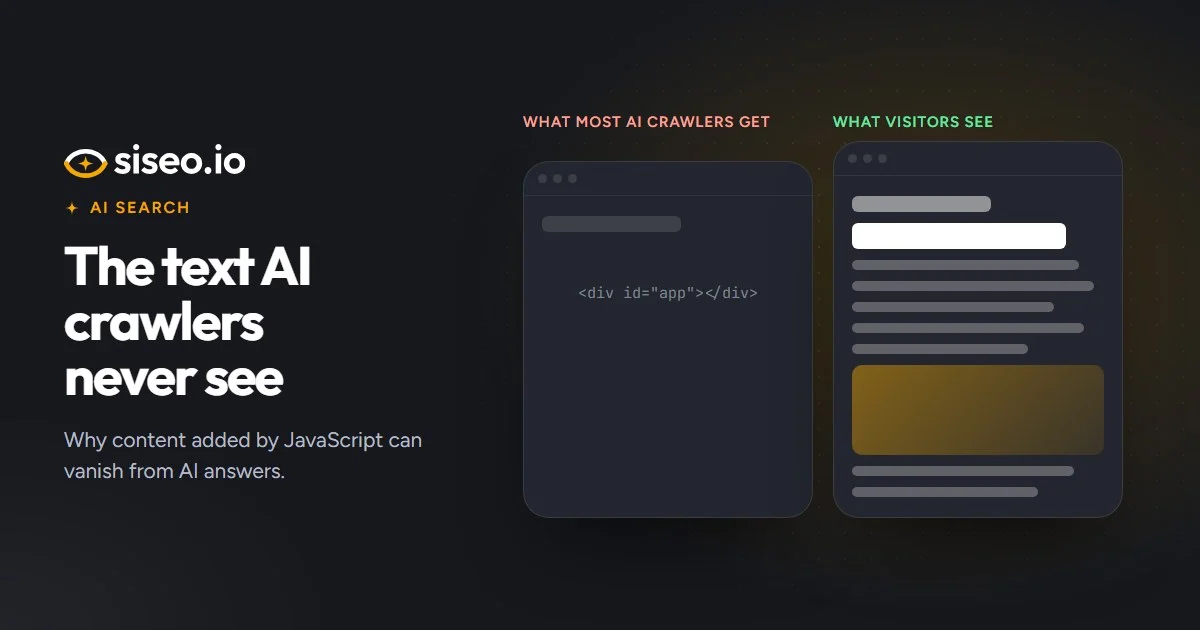
Open one of your pages in a browser and everything is there: the heading, the product details, the menu, the reviews. Now picture the same page with JavaScript switched off. On some sites a good part of it disappears, and that stripped-down version is what most AI crawlers read.
Every page has two versions
When a page is requested, your server sends HTML: the text, links and tags that make up the page. The browser then runs the page’s JavaScript, which can add more, such as text loaded from elsewhere, a menu, a reviews widget or a product grid. The result is called the rendered page.
Where the server sends everything, the two versions match. Where the page is built in the browser, the HTML can be close to empty. At the extreme, a single-page app sends little more than this:
<body>
  <div id="root"></div>
  <script src="/app.js"></script>
</body>
Everything visitors see is added by that script. The gap can also be smaller: the page is in the HTML, but the reviews, a set of tabs or the menu are filled in by JavaScript.
Who runs JavaScript, and who doesn’t
Google does. It renders pages much like a browser, loading their CSS and JavaScript, but it does so after the first fetch, when it has the resources. Content that appears only after rendering can therefore take longer to show up in Search. Google’s AI Overviews and AI Mode rely on Googlebot, the same crawler.
Most AI crawlers don’t. GPTBot, ClaudeBot and PerplexityBot, among others, read only the raw HTML your server sends, so they see the thin version of the page, and they can’t quote or recommend what isn’t there. Many link previews, the cards that appear when someone shares your page in a chat app, work the same way. Our guide to AI crawlers explains which crawler does what.
What goes missing
Text is the obvious loss, but not the only one. The table shows what happens to each part of a page when JavaScript adds or changes it. Three terms in it: structured data is code that describes the page to search engines, the canonical tag names the page’s main address, and a noindex rule asks search engines to leave the page out of their results.
| Added or changed by JavaScript | Crawlers that read only HTML | |
|---|---|---|
| Main text | Not seen, so it can’t be quoted | Seen after rendering, which can come later |
| Menus and links | Can’t be followed to your other pages | Followed after rendering, if they are real links |
| Page title | The page has no name | Picked up after rendering |
| Main heading (H1) | The line that says what the page is about is missing | Seen after rendering |
| Structured data | Missed entirely | Read after rendering, so price and stock changes may be picked up late |
| A changed canonical tag | Only the HTML version counts | May pick a different version than you intended |
| A changed noindex rule | Only the HTML version counts | If the HTML says noindex, Google may skip rendering and leave the page out |
Links matter more than they look. Pages that can only be reached through links added by JavaScript may be found late or not at all. Even Google follows only real links, <a> elements with an href, not buttons or click handlers without an address.
How to check your own pages
- Open a page and choose “View page source”. That is the HTML your server sent, close to what a crawler that skips JavaScript reads.
- Search it for a sentence from the main text. If it isn’t there, JavaScript adds it.
- Search for the other parts too:
<title>,<h1,rel="canonical",application/ld+jsonand the addresses your menu links to. - Compare it with the rendered page: right-click the page and choose Inspect to see it after its scripts have run.
- For Google’s view, use URL Inspection in Search Console, which shows how Google reads the page.
siseo makes this comparison when it scans a site. SiseoBot, its crawler, reads the HTML your server sends, and a headless browser (one run by software, without a screen) renders a sample of pages, so the two versions can be compared: words, title, main heading, links, structured data, canonical tag and robots rules. A page is flagged when at least 30% of the words a browser shows are missing from the HTML.
In short: if a sentence, link or tag isn’t in “View page source”, most AI crawlers won’t see it, and Google will see it later than the rest of the page.
How to fix it
Put the parts that matter in the HTML your server sends, and use JavaScript for what happens after that. For your developer, Google’s JavaScript SEO basics and web.dev’s Rendering on the web are good starting points.
- Render on the server. Server-side rendering builds each page’s HTML on the server when it is requested; static generation builds it in advance. Most frameworks support both, including Next.js, Nuxt, Astro, SvelteKit and Remix.
- Let your CMS output the text. Main text, headings and product details should come from the template, not from a script that fetches them after the page loads.
- Make links real links. Menus, product grids and pagination should be normal links in the HTML, such as
<a href="/pricing/">Pricing</a>. If you use infinite scroll or a “load more” button, also provide numbered pages with normal links. - Keep the title, canonical tag and robots rule in the HTML, and don’t let scripts change them afterwards.
- Put structured data in the HTML too, built from the same data the page shows. Our structured data guide covers what to include.
Where JavaScript-only content usually comes from
The big site builders send complete HTML, so the cause is usually something added on top:
- WordPress: themes normally output content in the HTML. The usual culprit is a widget, such as reviews, tabs, product grids or sliders, or a headless front end. Check the plugin’s settings for a server-rendered option, or replace it.
- Shopify: Liquid themes render on the server. Content that needs JavaScript usually comes from apps, such as reviews, FAQs or size guides, so prefer apps that output their content in the page.
- Wix and Squarespace: pages are rendered on their servers, but custom code, embeds and third-party widgets load in the browser. Keep important text in regular text elements.
- Webflow: publishes static HTML, so look at custom code embeds and client-side scripts, such as a CMS filtering library.
What doesn’t matter
JavaScript itself isn’t the problem. Menus that open, tabs that switch and filters that update are fine, as long as the text and links they show are already in the HTML. A few words added by a script won’t hurt either; the concern is the main text, headings and links.
Google asks that a canonical tag set by JavaScript match the one in the HTML, or that the HTML leave it out, so a script that adds one to a page without one is fine; changing an existing one is the problem. And serving crawlers a lighter, prerendered version of a page is fine too, as long as it has the same text, headings and links as the page visitors see.